What Your Clients Actually See: Inside the InspectForge Digital Inspection Report
What Your Clients Actually See: Inside the InspectForge Digital Inspection Report
Your inspection report is your product. It is the deliverable that clients pay for, agents judge you by, and homebuyers use to make the biggest financial decision of their lives. So what does a modern, digital inspection report actually look like from the client's perspective? Here is a walkthrough of the InspectForge report experience — from the moment a client opens the email to the last page of findings.
Why the Client Experience Matters More Than You Think
Most inspectors focus on what goes into a report — thoroughness, accuracy, proper Standards of Practice language. Those things are essential. But they are table stakes. What separates inspectors who earn repeat referrals from those who do not is often how the report is experienced by the person reading it.
Consider who reads your reports:
- First-time homebuyers who have never seen an inspection report before and are already anxious about the biggest purchase of their lives
- Real estate agents who review dozens of reports per year and immediately notice which ones are professional and which are not
- Sellers and listing agents who need to quickly understand what needs to be addressed
- Contractors who need to find specific findings and photos to prepare repair estimates
Each of these readers has different needs, but they all share one thing: they want to understand the property's condition quickly, clearly, and without confusion.
A report that is technically accurate but difficult to navigate, poorly formatted, or hard to read on a phone is a report that generates follow-up calls, confuses clients, and costs you referrals.
How Clients Receive an InspectForge Report
Step 1: The Email
After you mark an inspection as delivered, InspectForge automatically sends an email to the client with a secure link to view their report. The email includes:
- Your company name and logo
- The property address
- A prominent "View Your Report" button
- No attachments to download, no passwords to remember, no accounts to create
The client clicks the link and lands directly on their interactive report. That is it — no friction, no barriers.
Step 2: Instant Access on Any Device
The report opens in the client's browser — desktop, tablet, or phone. There is no app to install, no PDF to download (though PDF is available if they want it), and no login required.
This matters more than most inspectors realize. Many clients check their report on their phone in the car after the inspection, or share the link with family members who open it on whatever device is nearby. A report that only works well on desktop or requires a specific app loses readers before they start.
The Report Interface: Two Ways to Read
InspectForge reports offer clients two viewing modes, and they can switch between them with one click:
Card View: Visual, Scannable, Modern
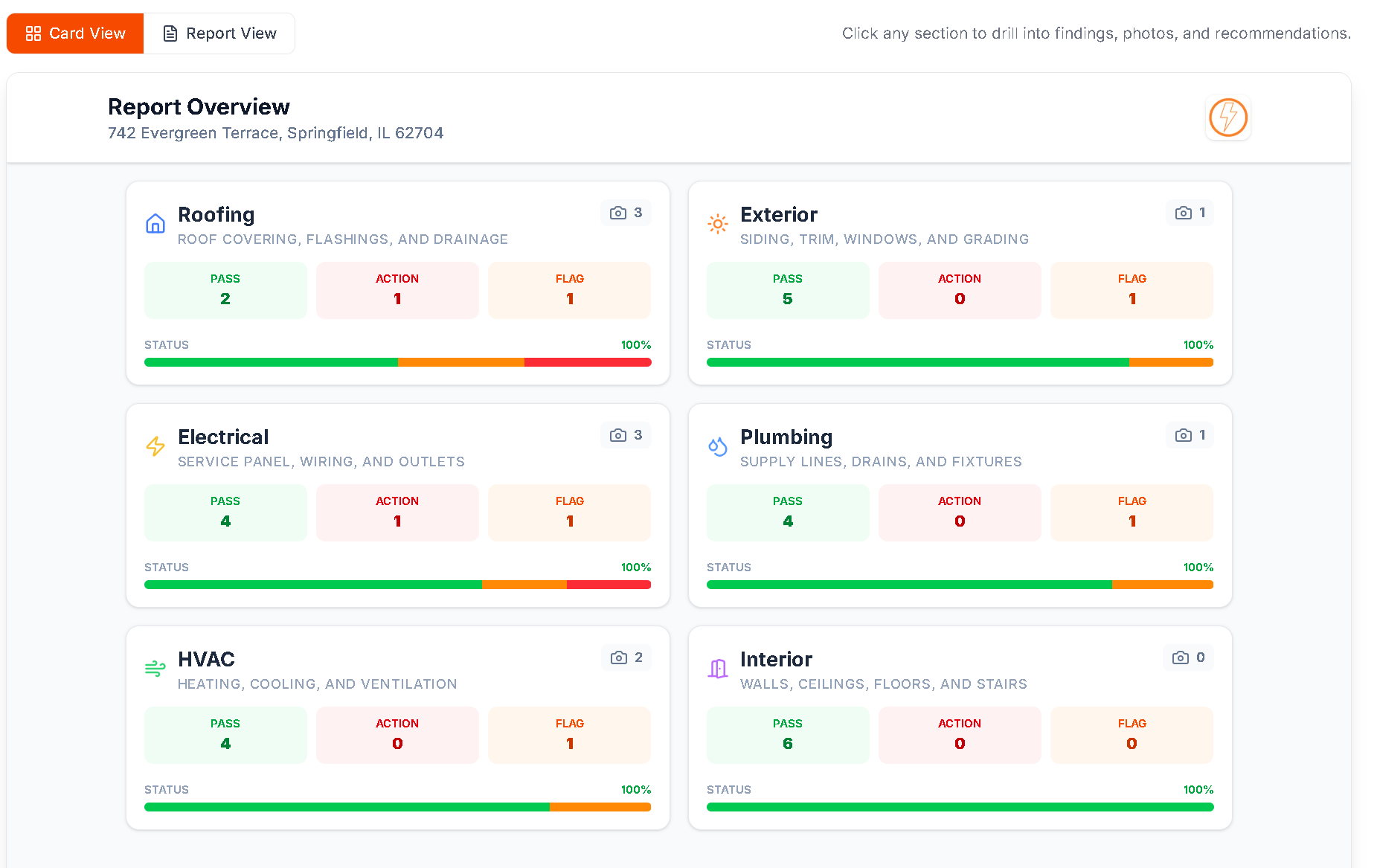
The default view presents the report as a grid of interactive cards — one card per inspection section (Roof, Electrical, Plumbing, HVAC, etc.). Each card shows:
- Section name with a clear icon
- Color-coded status indicator showing the overall condition of that section
- Finding count so the client knows how many items are documented
- Click to expand into the full findings for that section
This card-based layout is designed for the way people actually consume information in 2026 — scanning, tapping, drilling into what matters. It is particularly effective on mobile, where scrolling through a 40-page document is impractical.
When a client clicks into a section, they see every finding with:
- A clear description of what was observed
- The severity rating (color-coded)
- Annotated photos showing exactly where the issue is
- Recommendations for next steps
They can tap any photo to zoom in, swipe between findings, and navigate back to the card grid at any time.
Report View: Traditional Document Layout
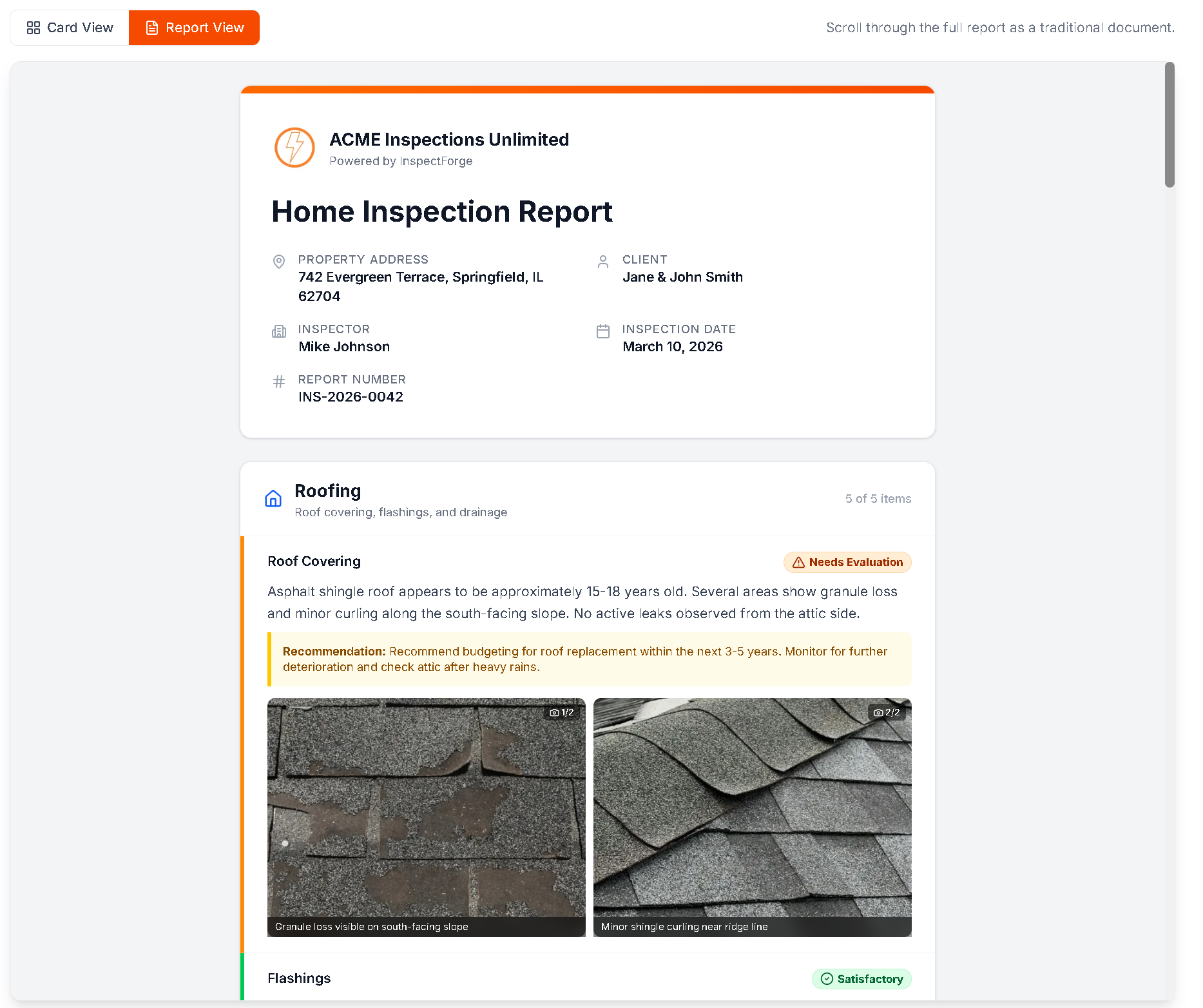
For clients who prefer a linear reading experience — or who want to print the report — the Report View presents everything as a traditional scrollable document. This includes:
- Cover page with property details, inspection date, and your company branding
- Table of contents with clickable section links
- Full findings organized by section, with photos inline
- Executive summary (if AI-generated)
- All the same content as Card View, just in a linear format
Both views contain identical information. The client chooses the format that matches how they want to read.
Color-Coded Severity: Clarity at a Glance
Every finding in an InspectForge report is assigned a severity level with a distinct color:
| Color | Severity | What It Means |
|---|---|---|
| Green | Satisfactory | Component is in acceptable condition, functioning as intended |
| Yellow | Needs Evaluation | Condition requires further assessment by a specialist |
| Orange | Needs Attention | Deficiency that should be addressed but is not an immediate safety concern |
| Red | Defective | Significant deficiency, potential safety hazard, or requires immediate repair |
This four-level system gives clients an instant visual understanding of their property's condition. They do not need to read every word of every finding to know which sections need attention — they can scan the color indicators and focus on what matters most.
Agents especially appreciate this system. When reviewing a report to advise their client, they can quickly identify red and orange items that may affect the transaction without reading 30+ pages of detailed findings.
The AI-Generated Executive Summary
One of the most client-facing features of an InspectForge report is the AI-generated executive summary. This appears at the top of the report and gives the reader a concise overview of the property's condition.
What the summary includes:
- A 3–5 sentence overview of the property's general condition
- The most critical findings highlighted by priority
- Recommended actions organized by severity
- Clear, non-technical language that any homebuyer can understand
Why this matters for clients:
Most homebuyers are not contractors. They do not know what "improper clearance at the combustion air intake" means in practical terms. The AI summary translates technical findings into plain language: "The furnace has an issue with its air intake that a licensed HVAC technician should evaluate before closing."
This summary is often the first (and sometimes only) section that agents and buyers read in full. Having it generated automatically — in clear, professional language — saves inspectors 15–30 minutes of manual writing per report and gives clients a better reading experience.
Photos That Actually Explain the Problem
Photos are arguably the most important part of any inspection report. But a photo alone rarely tells the full story. Is the crack in the foundation the small one on the left or the larger one on the right? Which wire in the electrical panel is the concern?
InspectForge reports include annotated photos with:
- Arrows pointing directly at the deficiency
- Circles highlighting areas of concern
- Text labels explaining what the annotation shows
- Multiple annotations per photo for complex findings
From the client's perspective, an annotated photo answers the question "What am I looking at?" without any back-and-forth communication. This is especially valuable when the report is shared with contractors for repair estimates — the contractor can see exactly what needs to be addressed without calling the inspector for clarification.
Photos are embedded directly in the report (not as separate attachments) and clients can tap or click to view them full-screen with pinch-to-zoom capability on mobile.
Professional Branding: Your Report, Your Brand
Every InspectForge report is branded with your company identity:
- Company logo on the cover page and header
- Custom color scheme that matches your business branding
- Contact information including phone, email, and website
- License and certification numbers for credibility
- Consistent formatting across every report you deliver
Why this matters: When an agent receives reports from five different inspectors, the one with professional branding, clean formatting, and a polished presentation stands out. It signals that the inspector takes their business seriously — and by extension, takes the inspection seriously.
Generic, unbranded reports (or reports that look like they were generated by basic software) subtly undermine the perceived value of the inspection, even if the content is excellent.
The Client Portal: Beyond the Single Report
On InspectForge's Pro and Business plans, clients and agents get access to a branded client portal — a dedicated dashboard where they can:
- View all their inspections in one place (useful for agents who work with you repeatedly)
- Track inspection status through a visual timeline: Scheduled → In Progress → Completed → Delivered
- Access signed agreements with timestamps and digital signatures
- View repair estimates broken down by priority (critical, high, medium, low) with cost ranges
- Download PDF versions of any report
- Share report links with other parties (contractors, family, attorneys)
Magic-Link Access: No Passwords
The client portal uses magic-link authentication — the client enters their email, receives a secure link, and clicks it to access their dashboard. No passwords to remember, no accounts to create. This is intentional: every friction point (account creation, password requirements, email verification) loses a percentage of users. Magic links eliminate all of that.
Mobile Experience: Where Most Clients Read Reports
According to web analytics across the inspection industry, 60–70% of inspection reports are first opened on a mobile device. This makes the mobile reading experience critical.
InspectForge reports are designed mobile-first:
- Card View adapts to single-column layout on phones with large, tappable cards
- Photos are full-width with pinch-to-zoom
- Navigation becomes a slide-out drawer (rather than a fixed sidebar) to maximize reading space
- Text is sized for mobile reading — no pinching to read findings
- Swipe navigation between findings within a section
- Print elements hidden — navigation controls and interactive elements do not appear when printing
The result is a report that looks and feels native on every device, not a desktop report crammed onto a small screen.
What Agents See (and Why It Gets You Referrals)
Real estate agents are the primary referral source for most home inspectors. Understanding what agents value in a report — beyond accuracy — is critical for building referral relationships.
What agents notice immediately:
-
Speed of delivery. Same-day reports demonstrate professionalism and keep the transaction moving. InspectForge's AI-powered workflow makes same-day delivery realistic for every inspection.
-
Executive summary quality. Agents skim the summary to understand the big picture. A clear, well-written summary (especially one organized by priority) saves agents time and helps them advise their clients.
-
Visual professionalism. Branded reports with clean formatting, color-coded findings, and annotated photos signal a professional operation. Agents associate report quality with inspection quality.
-
Client accessibility. If the agent's client calls confused about the report, that creates work for the agent. Reports that are easy to understand — with visual severity indicators, plain-language summaries, and annotated photos — reduce these calls.
-
Easy sharing. Agents often need to forward reports to listing agents, contractors, or attorneys. A shareable link that works on any device without downloads or logins makes the agent's job easier.
How It Compares: InspectForge Reports vs. Other Platforms
| Feature | InspectForge | Spectora | HomeGauge | Basic PDF Tools |
|---|---|---|---|---|
| Interactive HTML viewer | Yes (card + document views) | Yes (HTML only) | Limited | No |
| PDF download | Yes | Yes | Yes | Yes |
| Color-coded severity | 4-level system | Yes | Yes | Manual |
| AI executive summary | Yes (automatic) | No | No | No |
| Photo annotations | Arrows, circles, text | Limited | Limited | Manual |
| Client portal | Yes (Pro & Business) | No | No | No |
| Magic-link access | Yes (no passwords) | Link-based | Link-based | Email attachment |
| Mobile-optimized | Mobile-first design | Responsive | Basic | Varies |
| Custom branding | Logo, colors, contact info | Logo and colors | Logo | Manual |
| One-click delivery | Yes | Yes | Yes | Manual email |
| Repair estimates | AI-generated (optional) | No | No | No |
See It Yourself: Interactive Sample Report
Rather than taking our word for it, you can explore a sample InspectForge report right now. Our interactive sample report demonstrates both Card View and Report View with realistic inspection data.
Toggle between views, click into sections, zoom on photos, and experience exactly what your clients would see. The sample uses fictitious data but represents the actual report format and interaction model.
The Report Experience Inspectors Are Actually Delivering
Here is what the complete delivery workflow looks like when an inspector uses InspectForge:
- Inspector completes on-site inspection using the native mobile app — photos auto-attach to findings, annotations are added on-site
- Inspector taps "Generate Report" — findings are organized, numbered, and formatted automatically. No manual assembly.
- MI6 AI generates the executive summary — organized by severity, written in clear language
- Inspector reviews and taps "Deliver" — report link is emailed to the client instantly
- Client opens the link — full interactive report loads on any device, no login required
- Client explores Card View or Report View — navigates findings, zooms on photos, reads the summary
- Client shares the link with their agent, family, or contractor — everyone sees the same professional report
Total time from completing the inspection to client receiving the report: minutes, not hours.
What This Means for Your Business
The client-facing report experience directly impacts three metrics that determine your business growth:
1. Referral Rate
Agents refer inspectors who deliver fast, professional, easy-to-read reports. Every element of the InspectForge report — from color-coded severity to the AI summary to mobile optimization — is designed to make the agent's job easier. When agents recommend you, your marketing costs drop to zero for those leads.
2. Client Satisfaction
A client who receives a clear, well-organized report with annotated photos and a plain-language summary feels confident in the value of their inspection. A client who receives a dense, confusing PDF calls you with questions, leaves uncertain reviews, and does not refer you to friends.
3. Professional Reputation
Your report is the most visible artifact of your work. It is what clients show to family, what agents compare across inspectors, and what contractors reference for repairs. A professionally branded, well-designed report builds your reputation in ways that are difficult to quantify but impossible to ignore.
Try It With Your Next Inspection
Start your 14-day free trial at inspectforge.com — no credit card required. Generate your first report and see the client experience for yourself. You can also explore the interactive sample report right now to preview the Card View and Report View without signing up.
Your report is your product. Make it one that clients remember — and agents recommend.
Related Reading
- How to Write a Home Inspection Report That Stands Out — Report writing best practices and common mistakes
- AI in Home Inspection: How AI Is Changing the Industry — How MI6 AI generates summaries, comments, and photo analysis
- Best Home Inspection Software 2026 — Full platform comparison including report capabilities
- InspectForge Report Generator — Detailed feature page for the report generation system
Report features described in this article reflect InspectForge as of March 2026. Features may vary by plan tier — the client portal and AI executive summaries are available on Pro and Business plans. Start a free trial to explore all report capabilities.