Fleet & EquipmentInspection Software
Digital twin technology for every vehicle and asset in your fleet. DOT pre-trip inspections, QR code scanning, recurring schedules, AI damage detection, and compliance dashboards — all in one platform. No per-vehicle fees.
What Is Fleet Inspection Software?
Fleet inspection software is a digital tool that helps fleet managers, drivers, and operators conduct, document, and track vehicle and equipment inspections to meet DOT, OSHA, and FMCSA compliance requirements. InspectForge is a fleet inspection platform that uses digital twin technology — giving every vehicle and asset a persistent digital identity with QR code scanning, VIN decoding via NHTSA data, and complete inspection history. Unlike per-vehicle pricing models used by competitors such as Whip Around and Fleetio, InspectForge charges flat monthly pricing and includes AI-powered damage detection, DOT pre-trip templates (49 CFR 396.13), recurring inspection schedules, and compliance dashboards in every plan.
QR
Scan-to-Inspect
DOT
Compliant Templates
AI
Damage Detection
$0
Per-Vehicle Fees
Built for Every Fleet & Equipment Operation
From delivery trucks to concrete batch plants — InspectForge handles daily inspections, compliance, and maintenance tracking
Delivery Fleets
Daily pre-trip and post-trip inspections for delivery trucks, vans, and service vehicles. DOT-compliant DVIRs with driver sign-off and automatic compliance tracking.
Concrete Batch Plants
Mixer truck daily checks, batch plant equipment rounds, conveyor inspections, and safety audits. Track drum condition, hydraulics, and dust collectors.
Heavy Equipment
Excavators, cranes, forklifts, and generators. Daily condition monitoring, hydraulic checks, and OSHA compliance documentation for every piece of equipment.
Service Vehicles
HVAC, plumbing, and electrical service fleets. Track tool inventory, vehicle condition, and equipment calibration across your mobile workforce.
Construction Fleets
Manage inspections across job sites for dozers, loaders, dump trucks, and support vehicles. Centralized compliance across distributed crews.
Rental Equipment
Pre-rental and post-rental condition reports for equipment rental companies. Photo documentation with AI damage comparison between check-out and return.
Powerful Features for Fleet Operations
Purpose-built tools for vehicle inspections, equipment checks, and regulatory compliance
Digital Twin Asset Registry
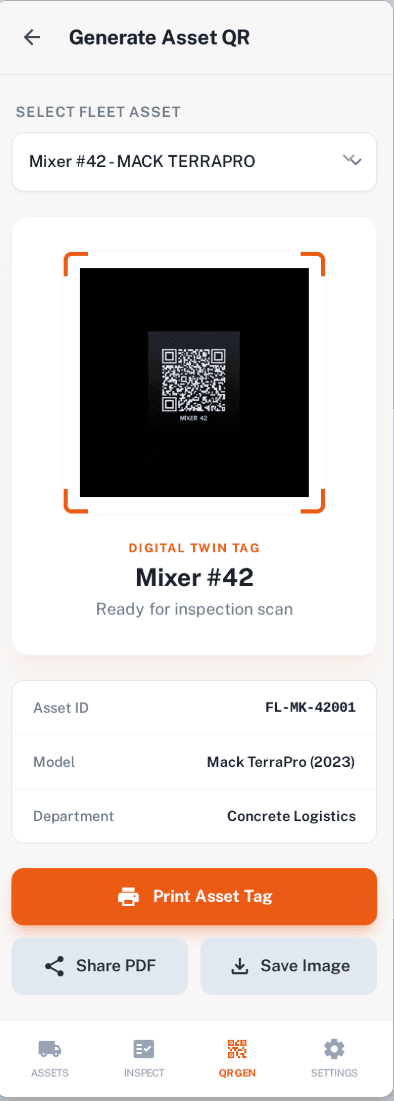
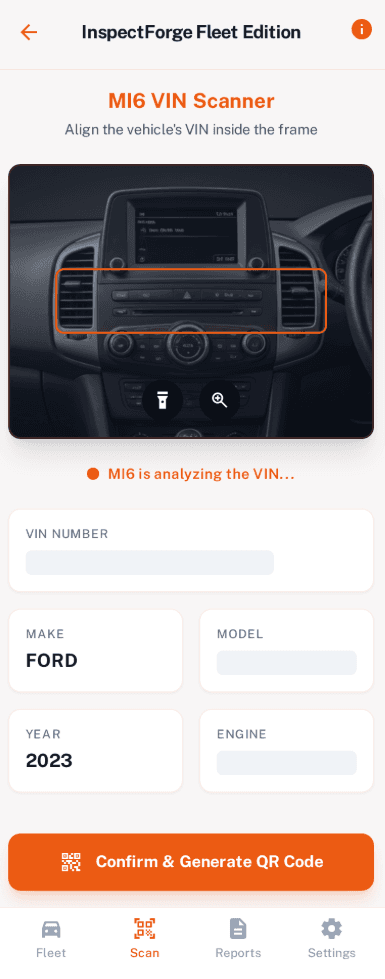
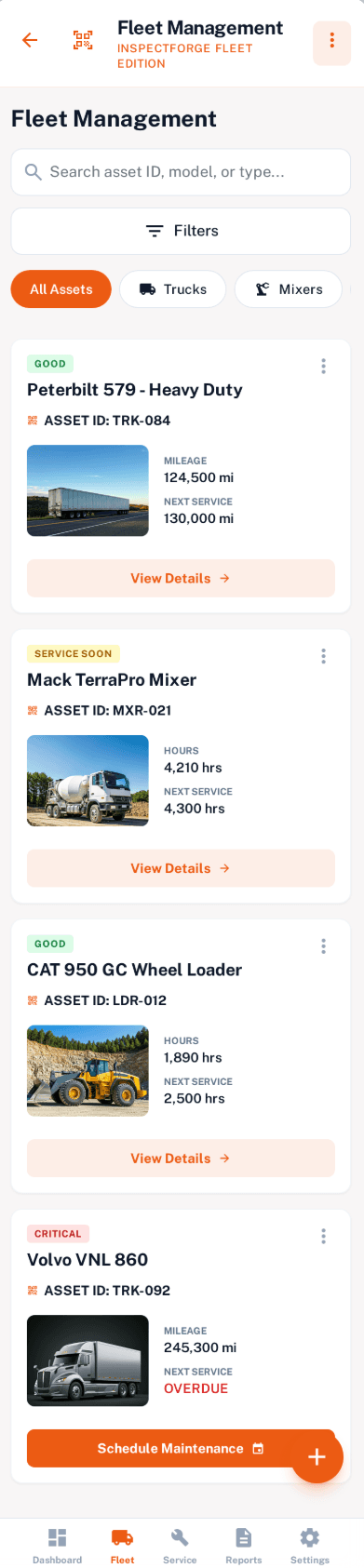
Every vehicle and piece of equipment gets a persistent digital identity. Scan a QR code to instantly pull up the asset's full history — inspections, maintenance, compliance, and operator assignments. VIN scanning auto-creates digital twins with make, model, and year data from NHTSA.
- QR code scanning for instant asset lookup
- VIN scanning with AI-powered decoding
- Complete digital twin for every asset
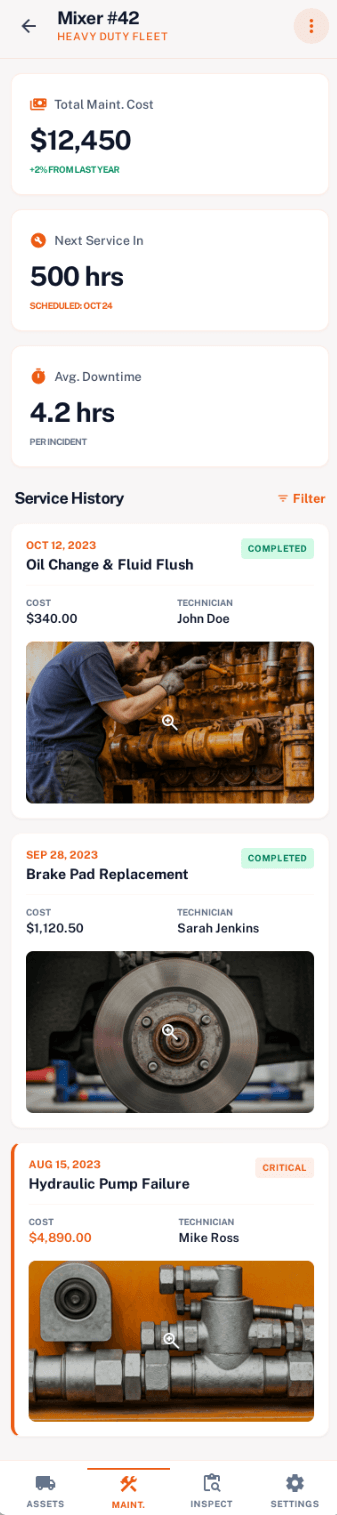
- Maintenance history and cost tracking
- Operator assignment and scheduling
Recurring Inspection Schedules
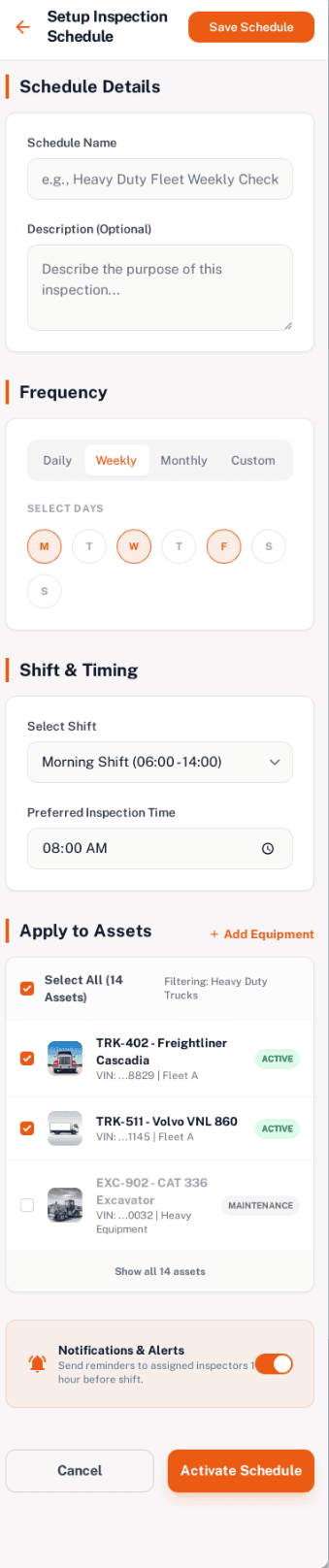
Set it and forget it. Configure daily, weekly, or custom inspection schedules per asset or fleet-wide. Inspectors get automatic push notifications when inspections are due. Never miss a DOT pre-trip or equipment safety check again.
- Daily, weekly, monthly, or custom intervals
- Automatic inspection generation
- Push notifications to assigned drivers
- Overdue alerts for fleet managers
- Calendar view for schedule management
Pass/Fail Checklists & DOT Templates
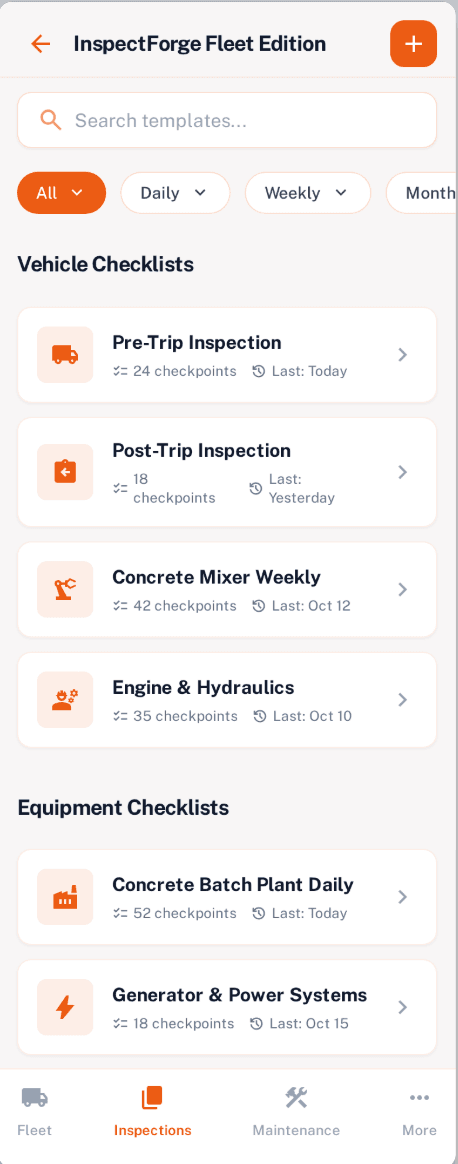
Purpose-built pass/fail inspection checklists designed for speed. Pre-loaded DOT pre-trip templates (49 CFR 396.13), heavy equipment daily checks, and batch plant safety rounds. Compliance-critical items automatically flag assets as out-of-service on failure.
- Large pass/fail buttons for fast field use
- DOT pre-trip inspection templates included
- OSHA equipment check templates
- Auto out-of-service flagging on critical failures
- Regulatory references on each checklist item
AI-Powered Damage Detection
Snap a photo of a tire, hydraulic line, or equipment surface — MI6 AI analyzes it for visible damage, rust, cracks, fluid leaks, and wear patterns. Get severity ratings and recommended actions instantly, right in the inspection flow.
- Photo analysis for damage and wear
- Tire condition and tread depth estimation
- Severity ratings: Minor / Moderate / Critical
- Predictive maintenance suggestions
- Trend analysis across inspection history
Compliance Dashboard
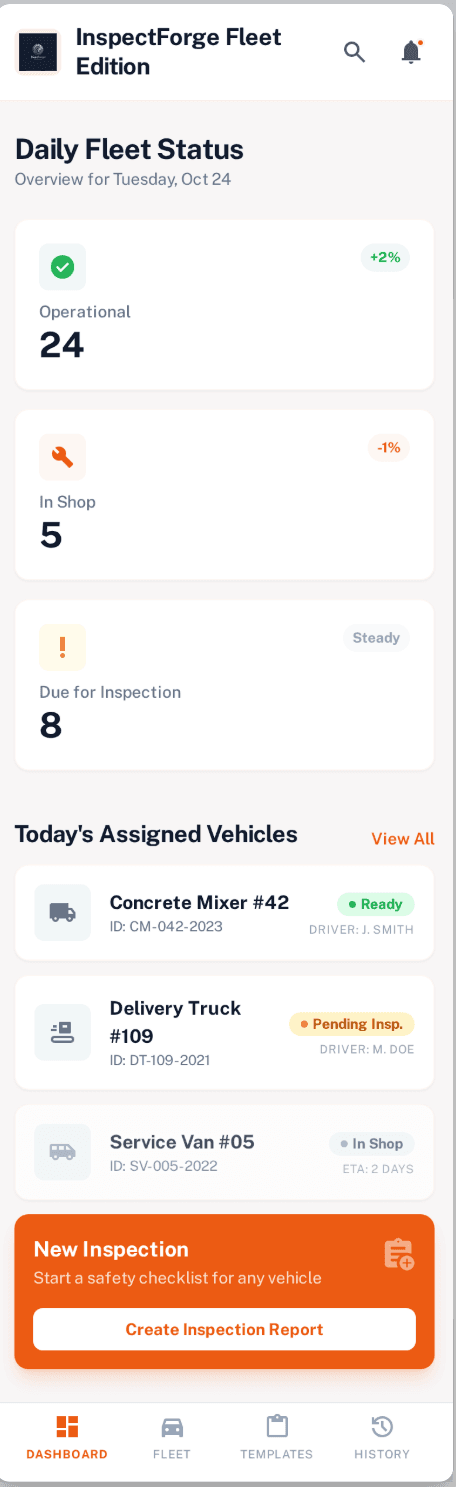
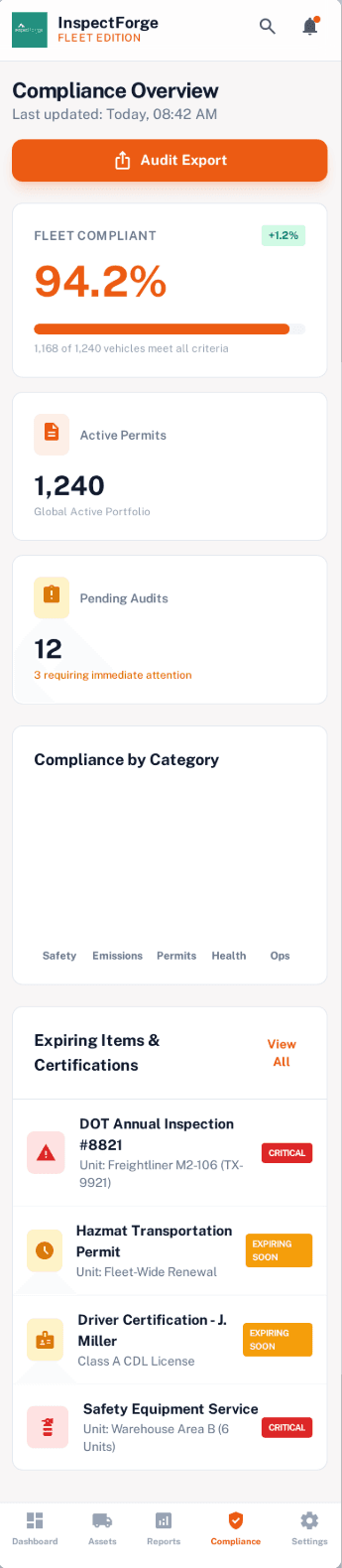
See your entire fleet's compliance status at a glance. Track DOT annual inspections, state emissions, OSHA equipment certifications, and operator licenses. Get alerts 30 days before anything expires so you're never caught off-guard.
- Fleet-wide compliance score
- DOT, OSHA, and state regulation tracking
- 30-day expiration alerts
- Compliance history and audit trail
- Exportable compliance reports
Driver & Operator Management
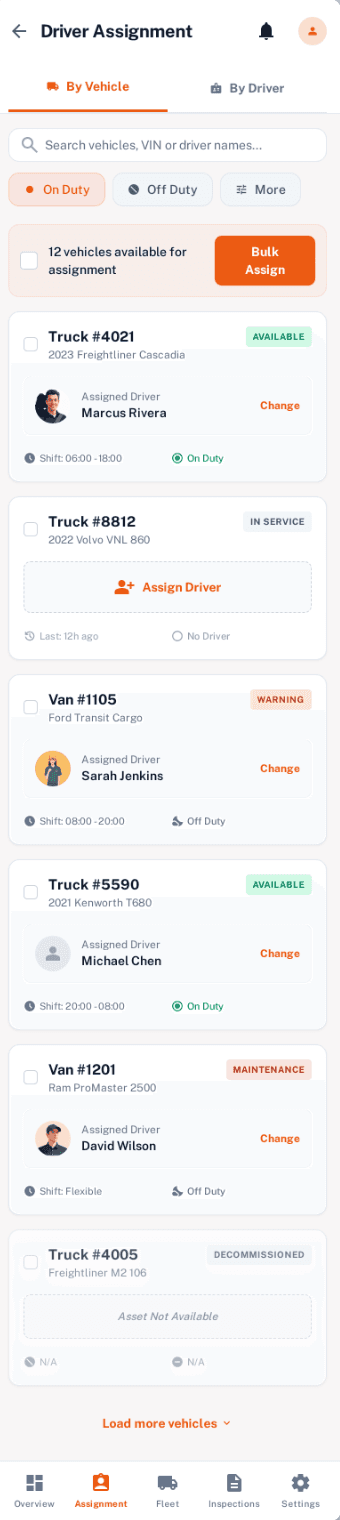
Assign drivers to vehicles, operators to equipment. Track completion rates, inspection quality, and response times per person. Bulk assign recurring schedules across your workforce with shift-based timing.
- Driver-to-vehicle assignment
- Completion rate tracking per driver
- Bulk schedule assignment
- Shift-based inspection timing
- Driver activity feed for managers
Fleet Inspection Walkthrough
Watch a complete walkthrough of InspectForge for fleet managers — vehicle inspections, walkaround checklists, defect tracking, and compliance reporting.
How QR Scan-to-Inspect Works
From scan to signed report in minutes — not hours
Scan QR Code
Driver scans the QR tag on the vehicle or equipment with their phone camera.
Start Checklist
The correct inspection template loads automatically with asset details pre-filled.
Inspect & Document
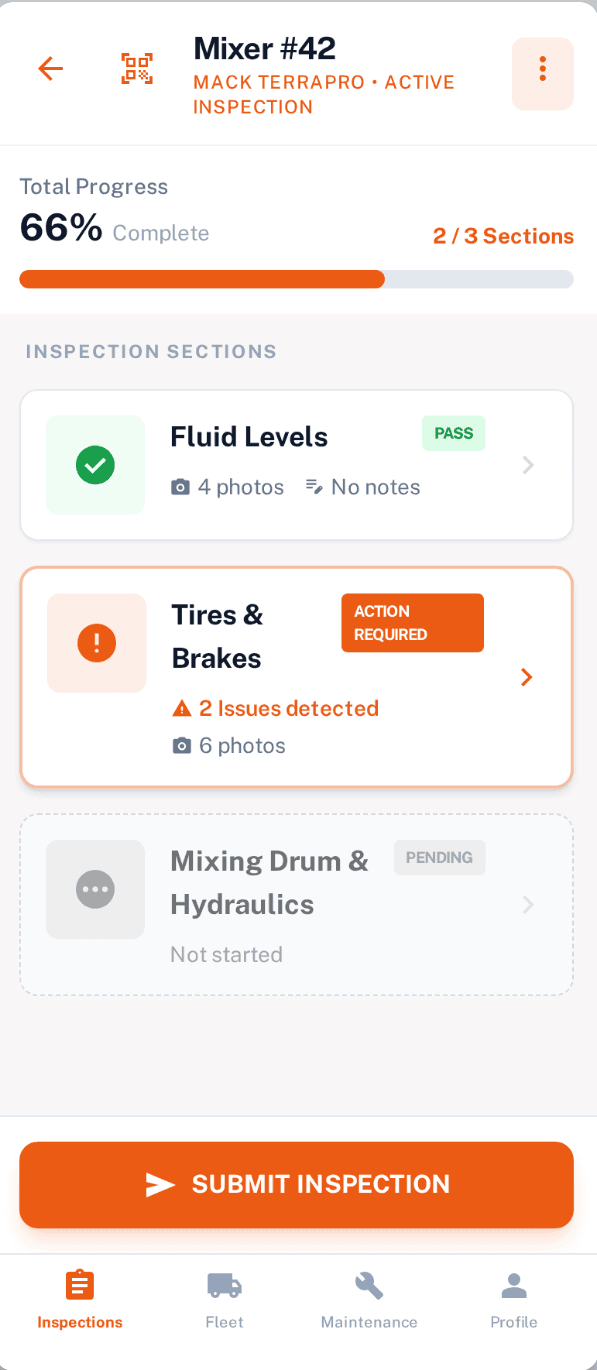
Tap pass/fail for each item. Snap photos — AI analyzes for damage automatically.
Sign & Submit
Review summary, sign digitally, submit. Fleet managers see results instantly.
See the Fleet Edition in Action
Purpose-built mobile screens for fleet managers, drivers, and equipment operators
Fleet Dashboard
Asset Registry
Inspection Templates
Live Inspection
VIN Scanner
QR Code Generator
Schedule Setup
Compliance
Driver Assignment
Maintenance Log
Scroll to see all screens →
Why InspectForge for Fleet Inspections?
Flat pricing, AI built in, and a unified platform for every inspection type
| Feature | InspectForge | Whip Around | Fleetio |
|---|---|---|---|
| Pricing Model | Flat monthly | Per vehicle/month | Per vehicle/month |
| AI Damage Detection | Included | Not available | Not available |
| Digital Twin / QR Scan | Included | Basic QR | Basic QR |
| VIN Scanning + Auto-Decode | Included | Manual entry | Manual entry |
| DOT Pre-Trip Templates | Included | Included | Add-on |
| Home + Commercial + Fleet | Unified platform | Fleet only | Fleet only |
| Offline Mobile | Full offline | Limited | Limited |
| Predictive Maintenance AI | Planned | Not available | Not available |
Try Fleet Inspections Free for 14 Days
Digital twins, QR scanning, DOT compliance templates, and AI damage detection are all included on every plan. No per-vehicle fees. No credit card required to start.
Questions? Email us at [email protected]
Fleet Inspection Software FAQ
Are fleet inspection features available now?
Yes. Fleet and equipment inspection features are fully integrated into InspectForge and available on all plans. Sign up for a free 14-day trial to start using digital twins, QR scanning, DOT templates, and AI damage detection today.
Do fleet inspections work with InspectForge's existing features?
Yes. Fleet inspections are built into the same InspectForge platform. If you currently use InspectForge for home or commercial inspections, you can add fleet capabilities to your existing account with the industry selector. Everything works together seamlessly.
What is a digital twin?
A digital twin is a persistent digital identity for a physical asset — like a truck, mixer, or crane. It stores the asset's full history: every inspection, maintenance event, compliance record, and operator assignment. Scan a QR code on the asset to instantly access its digital twin.
Does InspectForge support DOT pre-trip inspection requirements?
Yes. InspectForge includes DOT-compliant pre-trip inspection templates based on 49 CFR 396.13. These cover all required inspection points for commercial motor vehicles, with automatic out-of-service flagging for compliance-critical failures.
Will there be per-vehicle pricing?
No. InspectForge uses flat monthly pricing with asset limits per tier — not per-vehicle fees. This means predictable costs as your fleet grows. Our pricing model is designed to be significantly more affordable than competitors like Whip Around or Fleetio.
Can I use QR codes on my existing equipment?
Absolutely. You can generate and print QR code tags directly from InspectForge, or scan existing barcodes. Weatherproof QR stickers can be applied to any vehicle or piece of equipment. Scan to instantly start an inspection — no searching or typing.
Will the mobile app work offline for fleet inspections?
Yes. Just like our home and commercial inspection apps, fleet inspections work fully offline. Complete inspections in the field, in warehouses, or on remote job sites. Everything syncs when you reconnect.
How is InspectForge different from Whip Around or Fleetio?
InspectForge offers flat pricing (no per-vehicle fees), AI-powered damage detection, digital twin technology with QR/VIN scanning, and a unified platform for home, commercial, and fleet inspections. If you're an inspection company expanding into fleet work, there's nothing else like it.
Ready to Modernize Your Fleet Inspections?
Digital twins, QR scanning, DOT compliance, and AI damage detection — all without per-vehicle fees. Start your free trial today and see the difference.
Start Free 14-Day Trial
