Switching from HomeGauge to InspectForge: A Complete Migration Guide
Switching from HomeGauge to InspectForge: A Complete Migration Guide
Thinking about leaving HomeGauge? You are not alone. Whether it is rising per-inspection costs, limited AI features, or concerns about the EQT Partners acquisition, many experienced inspectors are evaluating their options. This step-by-step migration guide covers everything: exporting your data, rebuilding templates, notifying clients, and getting fully operational on InspectForge in under two weeks.
Why Inspectors Are Leaving HomeGauge
Before we get into the how, let's address the why. Based on inspector forums, community feedback, and conversations with inspectors who have made the switch, these are the most common reasons:
1. Per-Inspection Pricing That Punishes Growth
HomeGauge charges approximately $5 per published inspection report on top of a base subscription (~$60/month). At 20 inspections per month, your true cost is approximately $160/month. At 30 inspections, that jumps to $210. At 40, it is $260.
Every new inspection you win increases your software cost. That is a pricing model designed for the platform's growth, not yours.
2. ISN Dependency Adds Cost and Complexity
Many HomeGauge users rely on ISN (Inspector Services Network) for scheduling, online booking, and business management. ISN is a separate subscription ($40–$60/month), bringing your total software stack to $200–$320/month depending on volume.
InspectForge includes scheduling, online booking, calendar sync, and conflict detection natively — no separate subscription required.
3. Limited AI Capabilities
HomeGauge relies primarily on its pre-written comment library rather than AI-generated content. In 2026, inspectors using AI-powered tools are delivering reports 60–70% faster and producing more consistent, professional language. HomeGauge has not kept pace with this shift.
4. The EQT Partners Acquisition
In 2024, both HomeGauge and Spectora were acquired by EQT Partners, bringing them under the same corporate umbrella. This has raised legitimate concerns among inspectors:
- Will per-inspection pricing increase now that the two biggest competitors are under one roof?
- Will the platforms eventually merge, forcing users to adapt to a new workflow?
- Will innovation slow as private equity ownership prioritizes profitability?
These concerns have motivated many inspectors to explore independent alternatives before any forced changes occur.
5. Dated User Interface
HomeGauge's interface has not evolved at the same pace as newer platforms. Many inspectors describe it as functional but outdated, particularly on mobile where the companion app feels secondary to the desktop experience.
What You Gain by Switching to InspectForge
| Capability | HomeGauge | InspectForge |
|---|---|---|
| Pricing model | ~$60/mo + $5/report | $39–$99/mo flat (no per-report fees) |
| At 20 inspections/month | ~$160/mo | $39–$99/mo |
| Scheduling | Via ISN ($40–60/mo extra) | Built-in (included) |
| AI report writing | Pre-written comments only | MI6 AI: comments, summaries, photo analysis |
| AI photo analysis | No | Yes (Business plan) |
| AI template generation | No | Yes (Business plan) |
| Mobile app | Companion app (secondary) | Native iOS & Android (primary) |
| Offline mode | Limited | Full offline with auto-sync |
| Digital agreements | Yes | Yes (native with e-signatures) |
| Payment processing | Limited | Stripe integration |
| Team management | Yes | Yes (up to 10 inspectors) |
Before You Start: Pre-Migration Checklist
Complete these steps before you begin your InspectForge setup. This protects your data and ensures a smooth transition.
Step 1: Export Your Existing Reports
Your historical inspection reports are valuable business records. Export them from HomeGauge before making any changes.
- PDF export: Generate PDF copies of all completed inspection reports. Most inspectors keep at least 12–24 months of reports on file for liability purposes.
- Client records: Export or screenshot your client/property database if you maintain one in HomeGauge.
- Template backup: Document your current template structure — section names, comment libraries, and any custom fields. You will use this as a reference when building InspectForge templates.
Step 2: Document Your Current Workflow
Write down your end-to-end inspection workflow:
- How do clients book inspections? (ISN, phone, email, website?)
- What happens when a booking is confirmed? (agreements sent, deposit collected?)
- What template(s) do you use for different property types?
- How do you handle on-site data entry? (laptop, tablet, phone?)
- What is your post-inspection process? (editing, summary writing, delivery?)
- How do clients receive reports? (email, portal link?)
Understanding your current workflow helps you replicate it in InspectForge — or improve it.
Step 3: Notify Your Team (If Applicable)
If you have a multi-inspector team, communicate the transition plan:
- Timeline for the switch
- Training expectations (InspectForge's interface is intuitive, but budget time for familiarization)
- Who is responsible for template creation
- Parallel-run period where both systems may be active
Step 4: Review Your ISN Subscription
If you use ISN for scheduling, decide whether to cancel it alongside HomeGauge. InspectForge's built-in scheduling replaces ISN's core functionality (online booking, calendar management, conflict detection). This alone saves $40–$60/month.
Week 1: Setting Up InspectForge
Day 1: Create Your Account
- Start your 14-day free trial at inspectforge.com — no credit card required
- Complete your company profile: business name, license number, contact information, logo
- Set up your branding: upload your logo, choose your report color scheme (use your existing brand colors for continuity)
- Configure your service area and business hours
Day 2–3: Build Your Templates
This is the most time-intensive part of the migration — but InspectForge's AI makes it dramatically faster than you might expect.
Option A: AI Template Generation (Recommended)
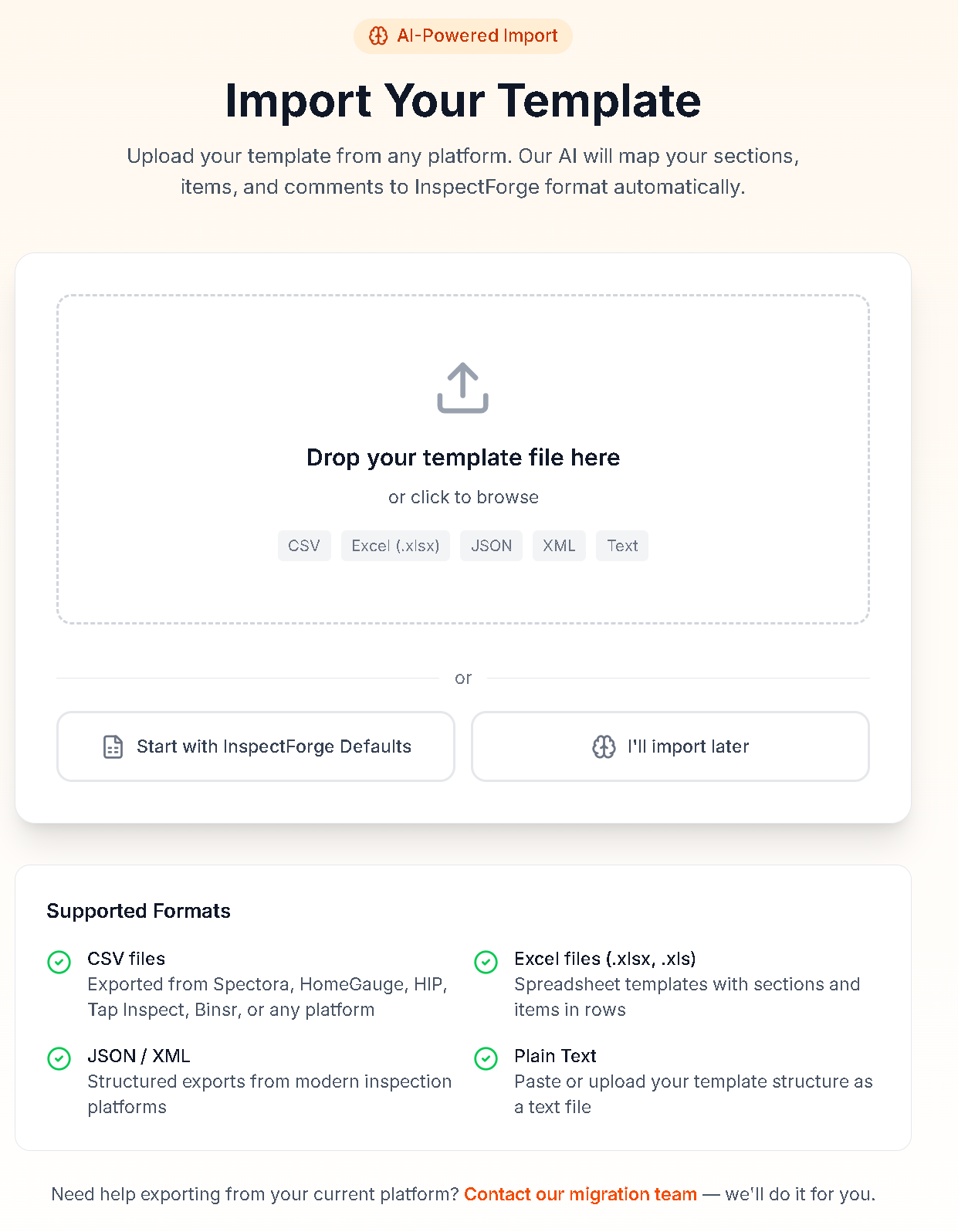
InspectForge's MI6 AI can generate complete inspection templates from a plain-language description. For example:
"Create a comprehensive residential home inspection template following ASHI Standards of Practice. Include sections for: structural components, exterior, roofing, plumbing, electrical, HVAC, insulation and ventilation, interior, and built-in appliances. Each section should have subsections for major components with finding options for satisfactory, deficient, not inspected, and not present."
The AI generates a complete template that you can then customize to match your existing workflow. Most inspectors report that AI-generated templates get them 80–90% of the way there, with 1–2 hours of manual refinement to match their preferences.
Option B: Manual Template Creation
If you prefer to build templates manually, use your HomeGauge template backup as a reference. Create sections and findings that match your existing structure. This takes longer but gives you complete control.
Template migration tips from HomeGauge users:
- Focus on your primary residential template first — get that right before building specialty templates
- Take the opportunity to clean up and modernize your template structure. Many HomeGauge templates have accumulated unused sections over the years.
- Test your template by running through a mental walkthrough of a typical inspection. Does it cover every area in your standard workflow?
Day 3–4: Configure Business Settings
- Scheduling: Set up your availability, service areas, and inspection types. Configure online booking if you want clients to self-schedule.
- Agreements: Upload or create your pre-inspection agreement. InspectForge supports digital signatures, so clients can sign electronically before the inspection.
- Payment processing: Connect your Stripe account for collecting payments at booking or after inspection.
- Email templates: Customize your confirmation, reminder, and report delivery email templates.
Day 5: Practice Inspection
Run a complete practice inspection — either at your own home or a willing friend's property. Walk through the entire workflow:
- Create a new inspection in InspectForge
- Use the mobile app to capture data and photos on-site
- Test the AI comment generation — select findings and let MI6 write the narratives
- Test photo annotation (arrows, circles, text)
- Generate the report and review the PDF output
- Test the AI executive summary generation
- "Deliver" the report to yourself and review the client experience
This practice run is critical. It reveals any gaps in your template, familiarizes you with the mobile app, and builds confidence before using the platform with real clients.
Week 2: Parallel Running and Transition
Day 6–8: Run Both Platforms Simultaneously
For your next 2–3 real inspections, complete them on both HomeGauge and InspectForge. This parallel run serves three purposes:
- Safety net — If anything goes wrong with InspectForge, you have the HomeGauge report ready
- Comparison — You can directly compare the report quality, speed, and workflow
- Template refinement — Real inspections reveal template adjustments you missed during setup
Most inspectors find that by the second parallel inspection, they are faster on InspectForge than expected — especially with AI-assisted report writing.
Day 9–10: Refine and Optimize
Based on your parallel-run experience:
- Adjust template sections or findings that did not flow naturally
- Customize AI behavior if certain narratives need tweaking
- Fine-tune your report branding and layout
- Set up any remaining business workflows (recurring inspections, team assignments, etc.)
Day 11–14: Full Transition
Once you are confident in your InspectForge workflow:
- Switch new bookings to InspectForge. Use InspectForge's scheduling for all incoming inspections.
- Complete any in-progress HomeGauge inspections. Finish work that was started on the old platform.
- Notify your referral agents. Send a brief email:
"Hi [Agent Name], I wanted to let you know I have upgraded my inspection software to InspectForge, a modern AI-powered platform. You will notice the report format looks slightly different — cleaner and more detailed, with AI-generated executive summaries that make it easier for your clients to understand the findings. The quality and thoroughness of my inspections has not changed. If you have any questions about the new report format, I am happy to walk you through it."
Most agents care about report speed and quality, not which platform you use. Proactive communication prevents any confusion.
After the Switch: Cancellation Checklist
Cancel HomeGauge
- Verify all historical reports are exported as PDFs
- Cancel your HomeGauge subscription to stop per-inspection billing
- Note the cancellation date — some platforms have notice periods
Cancel ISN (If Applicable)
- If you were using ISN for scheduling, verify that InspectForge's native scheduling covers your needs
- Cancel the ISN subscription (saves $40–$60/month)
- Update any website booking links to point to InspectForge's booking page
Update Your Online Presence
- Update your website with any new booking links or report delivery information
- Update your Google Business Profile if it references specific software
- Update business cards or marketing materials if they mention HomeGauge
Cost Savings After Migration
Here is what your monthly software costs look like before and after the switch:
Solo Inspector at 20 Inspections/Month
| Line Item | Before (HomeGauge + ISN) | After (InspectForge Pro) |
|---|---|---|
| Software subscription | ~$60/mo | $69/mo |
| Per-inspection fees | ~$100/mo (20 × $5) | $0 |
| Scheduling (ISN) | ~$50/mo | $0 (included) |
| Total | ~$210/month | $69/month |
| Annual cost | ~$2,520 | $828 |
| Annual savings | — | $1,692/year |
Solo Inspector at 30 Inspections/Month
| Line Item | Before (HomeGauge + ISN) | After (InspectForge Pro) |
|---|---|---|
| Software subscription | ~$60/mo | $69/mo |
| Per-inspection fees | ~$150/mo (30 × $5) | $0 |
| Scheduling (ISN) | ~$50/mo | $0 (included) |
| Total | ~$260/month | $69/month |
| Annual cost | ~$3,120 | $828 |
| Annual savings | — | $2,292/year |
Multi-Inspector Team (2 Inspectors, 40 Inspections/Month Combined)
| Line Item | Before (HomeGauge + ISN) | After (InspectForge Business) |
|---|---|---|
| Software subscription | ~$120/mo (2 seats) | $99/mo |
| Per-inspection fees | ~$200/mo (40 × $5) | $0 |
| Scheduling (ISN) | ~$50/mo | $0 (included) |
| Total | ~$370/month | $99/month |
| Annual cost | ~$4,440 | $1,188 |
| Annual savings | — | $3,252/year |
Common Concerns (and Honest Answers)
"Will I lose my old reports?"
No — as long as you export your HomeGauge reports as PDFs before canceling. Your historical reports are your business records. Export them, store them in a cloud drive (Google Drive, Dropbox, etc.), and they are yours forever regardless of what software you use going forward.
"What about my HomeGauge templates? I spent years building them."
You will need to recreate templates in InspectForge, but the AI template generation feature makes this dramatically faster than building from scratch. Most inspectors complete their primary template in 2–3 hours using AI generation plus manual refinement. Think of it as an opportunity to modernize — many HomeGauge templates have accumulated clutter over years of piecemeal edits.
"My agents are used to HomeGauge reports. Will they care?"
Most agents care about three things: report speed, report clarity, and whether findings are easy to understand. InspectForge delivers on all three. The AI-generated executive summary actually makes reports easier for agents and clients to digest compared to traditional formats. A brief heads-up email to your agents (template provided above) is all the communication needed.
"What if InspectForge doesn't work out?"
You have a 14-day free trial to evaluate the platform with no commitment. If you run the parallel workflow recommended in this guide, you will know within the first week whether InspectForge fits your business. If not, you have not canceled HomeGauge yet and can continue as before.
"Is InspectForge reliable enough for my business?"
InspectForge runs on enterprise cloud infrastructure with high availability. The native mobile apps include full offline mode — your inspections are never lost due to connectivity issues. That said, the platform is newer than HomeGauge. If you want a track record measured in decades rather than years, that is a fair consideration. The trade-off is modern AI features and pricing versus legacy stability.
"I do not use ISN. Does the savings calculation still work?"
Yes, though the savings are smaller. Without ISN, your HomeGauge cost at 20 inspections/month is approximately $160/month versus InspectForge Pro at $69/month — still a savings of $91/month or $1,092/year.
Migration Timeline Summary
| Day | Task | Time Required |
|---|---|---|
| Pre-migration | Export reports, document workflow | 2–3 hours |
| Day 1 | Create InspectForge account, set up branding | 30 minutes |
| Day 2–3 | Build primary template (AI-assisted) | 2–3 hours |
| Day 3–4 | Configure scheduling, agreements, payments | 1–2 hours |
| Day 5 | Practice inspection (full workflow test) | 2–3 hours |
| Day 6–8 | Parallel-run real inspections (2–3) | Normal inspection time |
| Day 9–10 | Refine templates and workflows | 1–2 hours |
| Day 11–14 | Full switch, notify agents, cancel HomeGauge | 1 hour |
Total active setup time: Approximately 10–15 hours spread across two weeks. Most of this is template creation and practice — the account setup itself takes under an hour.
Ready to Make the Switch?
Start your 14-day free trial at inspectforge.com — no credit card required. Follow the week-by-week plan in this guide, and you will be fully operational on a modern, AI-powered platform in under two weeks.
If you have questions about migrating from HomeGauge, reach out to our support team — we have helped hundreds of inspectors make the transition and can assist with template setup and workflow optimization.
Related Reading
- Spectora vs HomeGauge vs InspectForge: Complete Comparison — Full feature comparison across all three platforms
- Cheapest Home Inspection Software in 2026 — How every platform stacks up on real-world cost
- Home Inspection Software for New Inspectors — Getting started guide if you are new to the industry
- InspectForge Pricing Breakdown — Plan-by-plan comparison with annual savings
Information in this guide is based on publicly available data as of March 2026. Features and pricing may change. We recommend verifying current HomeGauge pricing and export capabilities directly with their support team before beginning migration. InspectForge is the publisher of this article — while we have aimed for accurate and helpful guidance, readers should consider this context.