DOT Pre-Trip Inspection Checklist: The Complete Digital Guide for Fleet Managers
DOT Pre-Trip Inspection Checklist: The Complete Digital Guide for Fleet Managers
Every commercial motor vehicle on US roads requires a driver vehicle inspection report (DVIR) before each trip. It is not optional — it is federal law under 49 CFR 396.11 and 396.13. But most fleet managers know the regulation exists while struggling with the reality of enforcing it consistently across every driver, every vehicle, every day. This guide covers exactly what the DOT pre-trip inspection requires, a complete checklist you can use today, and how digital tools turn compliance from a paperwork headache into a competitive advantage.
What Is a DOT Pre-Trip Inspection?
A DOT pre-trip inspection is a systematic check of a commercial motor vehicle (CMV) performed by the driver before operating the vehicle. The inspection covers safety-critical components and must be documented in a Driver Vehicle Inspection Report (DVIR).
The legal requirements:
- 49 CFR 396.11 — Every driver must prepare a written report at the end of each day for every CMV operated, documenting the vehicle's condition
- 49 CFR 396.13 — Before operating a CMV, the driver must be satisfied that it is in safe operating condition, review the previous driver's report, and sign to acknowledge any reported defects have been repaired or do not need repair
- 49 CFR 396.3 — Motor carriers must systematically inspect, repair, and maintain all CMVs under their control
Who must comply:
- Any motor carrier operating CMVs in interstate or intrastate commerce
- Vehicles with a GVWR of 10,001 lbs or more
- Vehicles designed to transport 16 or more passengers (including the driver)
- Vehicles transporting hazardous materials requiring placards
Penalties for non-compliance:
- FMCSA fines up to $16,000 per violation for carriers
- CSA (Compliance, Safety, Accountability) score impacts that increase insurance costs and trigger targeted inspections
- Driver placed out of service for operating an unsafe vehicle
- Potential criminal liability in accident investigations where inspections were not performed
The Complete DOT Pre-Trip Inspection Checklist
This checklist covers every component required under FMCSA regulations. Use it as a reference for building or validating your fleet's inspection process.
Engine Compartment
| Item | What to Check | Fail Criteria |
|---|---|---|
| Engine oil level | Dipstick reading within acceptable range | Below minimum mark |
| Coolant level | Reservoir at or above minimum line | Below minimum, visible leaks |
| Power steering fluid | Reservoir within acceptable range | Below minimum |
| Belts and hoses | Visual inspection for cracks, fraying, leaks | Visible damage, excessive wear |
| Wiring | No exposed, frayed, or damaged wiring | Exposed copper, melted insulation |
| Leaks | Check under vehicle for fluid puddles | Active fluid leaks |
Cab / Interior
| Item | What to Check | Fail Criteria |
|---|---|---|
| Seat belt | Functions properly, no damage | Fails to latch, frayed webbing |
| Mirrors | All mirrors present, properly adjusted, no cracks | Missing, cracked, or loose mirrors |
| Horn | Sounds when activated | Non-functional |
| Windshield | No cracks obstructing driver's view | Cracks in driver's primary viewing area |
| Wipers and washers | Blades make full contact, fluid sprays | Streaking, no fluid, incomplete sweep |
| Gauges and warning lights | All instruments functioning, no active warnings | Warning lights on, gauges non-functional |
| Heater / defroster | Produces heat, directs to windshield | Non-functional (safety requirement in cold weather) |
| Emergency equipment | Fire extinguisher charged, reflective triangles present | Missing, expired, or damaged |
Steering
| Item | What to Check | Fail Criteria |
|---|---|---|
| Steering wheel play | Less than 10 degrees of free play (power steering off) | Excessive free play |
| Steering column | No looseness, unusual sounds | Loose or binding |
| Steering linkage | No visible damage or excessive wear | Bent, cracked, or missing components |
| Power steering | No leaks, pump operates normally | Fluid leaks, whining pump |
Brakes
| Item | What to Check | Fail Criteria |
|---|---|---|
| Service brakes | Vehicle stops in a straight line, adequate stopping power | Pulls to one side, excessive stopping distance |
| Parking brake | Holds vehicle stationary on grade | Vehicle moves with parking brake engaged |
| Brake pedal | Firm pedal, no excessive travel | Spongy pedal, pedal reaches floor |
| Air brake system | Air pressure builds to governor cut-out, no audible leaks | Air leak rate exceeds 3 psi/min (single) or 4 psi/min (combination) |
| Low air warning | Activates between 55–75 psi | Warning does not activate |
| Air brake hoses and connections | No visible damage, secure connections | Cracked, cut, or leaking hoses |
| Brake drums / rotors | No visible cracks, excessive wear | Cracked drums, scored rotors |
| Brake pads / shoes | Visible pad remaining above minimum | Pads below minimum thickness |
Tires and Wheels
| Item | What to Check | Fail Criteria |
|---|---|---|
| Tire pressure | Visual inspection for proper inflation | Visibly flat or underinflated |
| Tread depth | Minimum 4/32" (steer), 2/32" (drive/trailer) | Below minimum depth |
| Tire condition | No cuts, bulges, exposed cord | Visible damage compromising tire integrity |
| Lug nuts | All present, no signs of looseness | Missing, loose, or cracked lug nuts |
| Wheel condition | No cracks, dents, or missing components | Cracked or damaged wheels |
| Hub seals | No leaks or missing seals | Active oil leak from hub |
Lights and Reflectors
| Item | What to Check | Fail Criteria |
|---|---|---|
| Headlights (low and high beam) | Both functional | Non-functional |
| Tail lights | Both functional | Non-functional |
| Brake lights | Illuminate when brakes applied | Non-functional |
| Turn signals (all four) | Flash at correct rate | Non-functional or incorrect rate |
| Hazard flashers | All four activate simultaneously | Non-functional |
| Clearance / marker lights | All functional | Non-functional (over 80" wide or 30' long) |
| Reflectors | Present and clean | Missing, cracked, or obscured |
| License plate light | Illuminates plate | Non-functional |
Suspension
| Item | What to Check | Fail Criteria |
|---|---|---|
| Springs | No cracked, broken, or shifted leaves | Broken or missing leaf spring |
| Air bags (if equipped) | Properly inflated, no leaks | Deflated, leaking, or damaged |
| Shock absorbers | No visible leaks, securely mounted | Leaking, loose, or missing |
| U-bolts and hangers | Secure, no visible cracks | Loose, cracked, or missing |
Exhaust System
| Item | What to Check | Fail Criteria |
|---|---|---|
| Exhaust pipes | No leaks under cab or sleeper | Leaks under cab or sleeper |
| Muffler | Securely mounted, functional | Loose, damaged, or missing |
| Exhaust system integrity | No holes or damaged sections | Holes allowing exhaust into cab |
Coupling Devices (Combination Vehicles)
| Item | What to Check | Fail Criteria |
|---|---|---|
| Fifth wheel | Properly greased, no cracks, locked | Cracked, not locked, missing parts |
| Kingpin | Properly seated in fifth wheel | Not fully engaged |
| Air and electrical lines | No damage, properly connected | Damaged, leaking, or disconnected |
| Safety chains / cables | Properly connected, no damage | Missing, disconnected, or damaged |
| Slider pins | Locked in position | Not locked |
Cargo Security
| Item | What to Check | Fail Criteria |
|---|---|---|
| Load securement | Properly tied down per FMCSA rules | Load shifted, loose, or unsecured |
| Tailgate / doors | Properly closed and secured | Open, unsecured, or damaged |
| Tarps (if required) | Properly secured over load | Missing or improperly secured |
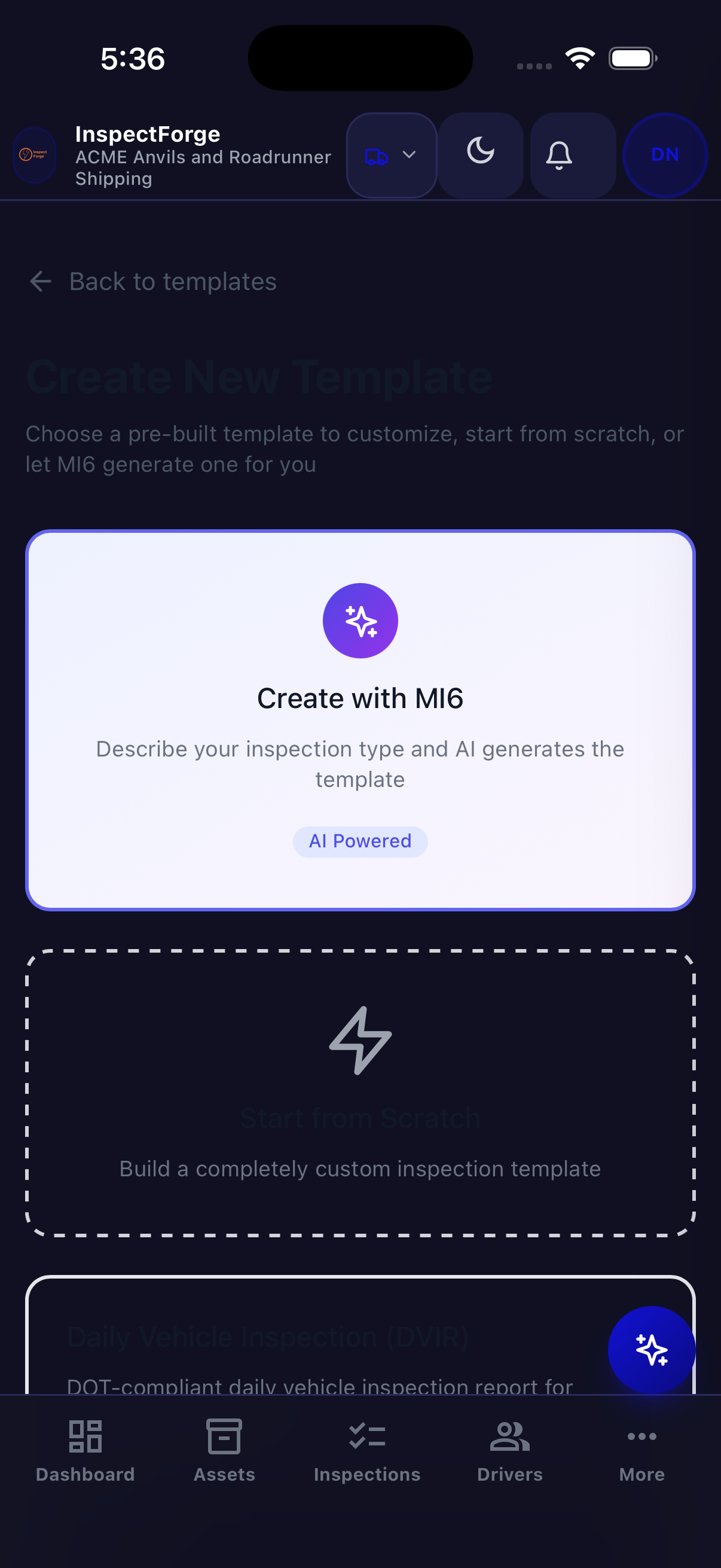
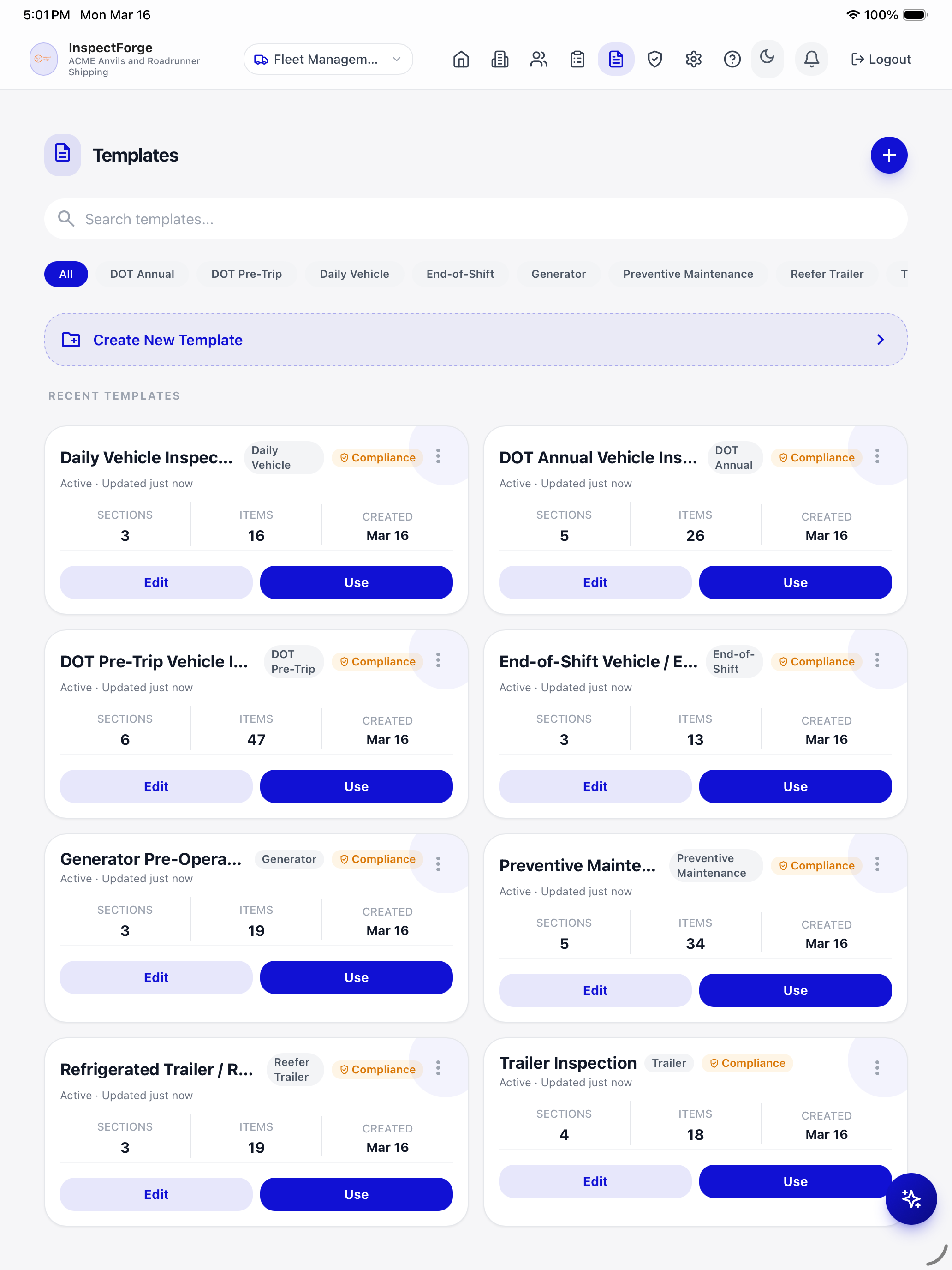
Want to go digital now? Start a free 14-day trial of InspectForge and load this entire checklist as a pre-built DOT template on your first inspection — no credit card required.
Why Paper Checklists Fail (and What to Use Instead)
Paper DVIRs have been the industry standard for decades. They technically satisfy the regulation, but they create serious operational problems:
Problem 1: Illegible and Incomplete Reports
Drivers filling out paper forms in the dark at 5 AM with cold fingers produce reports that are difficult or impossible to read. Inspectors and auditors cannot verify what was actually checked. Missing fields go unnoticed until an audit.
Problem 2: No Photo Evidence
Paper forms cannot include photographs. When a driver writes "tire appears worn," there is no visual evidence of what they observed. Was it 3/32" tread depth (borderline fail) or 6/32" (acceptable)? Without photos, there is no way to verify.
Problem 3: Reports Get Lost
Paper forms end up in truck cabs, shop floors, desk drawers, and trash cans. When a DOT auditor requests six months of DVIRs for a specific vehicle, assembling them from paper records takes hours — if they can be found at all.
Problem 4: No Real-Time Visibility
With paper, fleet managers learn about vehicle defects when the driver returns to the shop and hands over the form — hours or days after the inspection. Digital tools deliver defect alerts to the manager's phone the moment the driver flags an issue.
Problem 5: No Trend Analysis
Paper records cannot be analyzed for patterns. Is Vehicle #247 having recurring brake issues? Are Monday morning inspections catching more defects than Friday afternoon ones? Is one driver consistently missing items? Paper cannot answer these questions. Digital data can.
The Digital Alternative
Modern fleet inspection software replaces paper with a mobile app that:
- Guides drivers through every checklist item with large pass/fail buttons
- Captures timestamped photos as evidence for every finding
- Requires digital signatures from drivers and maintenance staff
- Sends instant alerts to fleet managers when critical defects are found
- Stores all records in a searchable, cloud-based system
- Tracks trends and patterns across vehicles, drivers, and time periods
How to Implement Digital Pre-Trip Inspections
Step 1: Choose Your Platform
Select fleet inspection software that includes:
- DOT pre-trip templates aligned with 49 CFR 396.13
- Native mobile apps for iOS and Android
- Offline mode (drivers inspect in areas without connectivity)
- Photo capture with annotation capability
- Digital signatures for driver sign-off
- Manager dashboard with defect alerts
- Exportable compliance reports for audits
Step 2: Configure Your Templates
Start with the standard DOT pre-trip checklist (provided above), then customize for your specific fleet:
- Add vehicle-specific items (e.g., refrigeration units for cold chain, liftgates for delivery trucks, PTO equipment for service vehicles)
- Mark safety-critical items that should automatically flag a vehicle as out-of-service on failure
- Add photo-required items for components where visual evidence is important (tires, brakes, body damage)
- Include regulatory references on each checklist item so drivers understand why they are checking it
Step 3: Deploy to Drivers
- Install the mobile app on every driver's phone or provide company tablets
- Assign QR code tags to every vehicle (scan to start inspection — no searching or typing)
- Train drivers on the new workflow (most digital inspection apps take 10–15 minutes to learn)
- Run paper and digital in parallel for one week so drivers build confidence
Step 4: Establish Manager Workflows
- Set up real-time alerts for critical defect findings
- Schedule a daily review of all completed inspections (takes 5–10 minutes with a dashboard)
- Configure automatic escalation for overdue inspections
- Establish a feedback loop: when maintenance resolves a defect, document the resolution in the inspection system
Step 5: Audit Your Process
After 30 days of digital inspections:
- Review completion rates by driver and vehicle — who is consistently completing inspections? Who is not?
- Check photo quality — are drivers taking useful photos or rushing through?
- Verify defect resolution times — how quickly are flagged issues being addressed?
- Export a sample compliance report — would this satisfy a DOT auditor?
Digital Pre-Trip Inspection with InspectForge
InspectForge is building fleet inspection capabilities that include DOT pre-trip inspection templates, AI-powered damage detection, and digital twin technology for every vehicle in your fleet.
How it works:
- Scan the QR code on the vehicle. The correct inspection template loads automatically with the vehicle's details pre-filled.
- Walk through the checklist. Large pass/fail buttons designed for field use. Tap through each item — no typing required for passing items.
- Photo + AI for defects. When you find an issue, snap a photo. MI6 AI analyzes it for damage severity — tire wear, body damage, fluid leaks — and generates a professional description automatically.
- Sign and submit. The driver signs digitally, the report is timestamped, and the fleet manager receives an instant alert for any critical findings.
- Compliance tracked automatically. The vehicle's digital twin updates with the inspection record. The compliance dashboard shows fleet-wide status at a glance.
What this means for your operation:
- Pre-trip inspections take 5–8 minutes with QR scan-to-inspect workflow
- Every inspection has timestamped photo evidence and digital signatures
- AI catches damage that manual visual inspection might miss — especially in low light or rushed conditions
- Fleet managers see defects in real-time, not hours later when paperwork arrives
- Six months of inspection records for any vehicle can be exported in seconds for audits
InspectForge fleet features are currently in beta. Join the beta program for early access and special launch pricing.
Common Pre-Trip Inspection Mistakes (and How to Avoid Them)
Mistake 1: "Pencil-Whipping" (Checking Everything as Pass Without Actually Inspecting)
This is the most common and dangerous problem. Drivers under time pressure check every item as "pass" without physically inspecting the vehicle.
Digital solution: Require photos for specific high-risk items (tires, brakes, lights). If a driver marks tires as "pass" but does not submit a photo, the inspection is flagged as incomplete. AI photo analysis provides an additional layer — the system can identify issues in photos even if the driver marked the item as passing.
Mistake 2: Skipping Inspections Entirely
When inspections are paper-based, it is easy for drivers to skip them and backfill the forms later. Fleet managers have no way to verify when (or if) the inspection actually occurred.
Digital solution: Digital inspections are GPS-tagged and timestamped. A fleet manager can verify that the inspection was completed at the vehicle's location at the expected time. Overdue inspection alerts notify managers when a scheduled inspection has not been started.
Mistake 3: Not Documenting Defect Repairs
A driver flags a defect, but no one documents the repair. The next driver sees the defect in the previous DVIR but has no way to verify it was fixed. This is a DOT violation.
Digital solution: Defect tracking workflows require maintenance to document the resolution — including parts used, labor performed, and a post-repair photo. The next driver's pre-trip report shows the defect and its documented resolution.
Mistake 4: Not Training Drivers on What to Actually Check
Handing a driver a 48-item checklist without training them on what each item means leads to superficial inspections. A driver who does not know what "excessive brake pedal travel" feels like will mark brakes as "pass" regardless.
Digital solution: Include reference photos and descriptions for each checklist item. When a driver taps on "brake pedal travel," they see a description of what excessive travel feels like and what to do if they detect it. AI photo analysis provides an objective second opinion.
Mistake 5: No Accountability for Inspection Quality
Without a way to measure inspection quality, fleet managers cannot identify drivers who are doing thorough inspections versus those who are rushing through.
Digital solution: Driver scorecards that track completion rates, average inspection time, photo quality, and defect detection rates. A driver who completes every inspection in 90 seconds flat is probably not doing thorough checks. A driver who averages 7 minutes with consistent photo evidence is demonstrating diligence.
Pre-Trip Inspection Frequency and Scheduling
DOT Requirements
- Pre-trip: Before operating the CMV each day
- Post-trip: At the end of each day the CMV is operated (49 CFR 396.11)
- Annual inspection: Comprehensive inspection by qualified inspector every 12 months (49 CFR 396.17)
Best Practices Beyond DOT Minimums
- Weekly detailed inspection: A more thorough check including under-vehicle components that are not practical to inspect daily
- Monthly tire measurement: Actual tread depth measurement (not just visual) with documented readings
- Seasonal checks: Pre-winter inspections (coolant, heater, defrost, tire chains) and pre-summer inspections (AC, coolant levels, tire pressure adjustments)
Digital inspection software with recurring schedules automates this entire cadence. Configure daily, weekly, monthly, and seasonal inspection templates per vehicle type, and the system generates inspections and notifies assigned drivers automatically.
The ROI of Digital Fleet Inspections
| Metric | Paper Process | Digital Process | Savings |
|---|---|---|---|
| Inspection time per vehicle | 15–20 minutes | 5–8 minutes | 50–60% time saved |
| Defect detection rate | ~60% (estimated) | ~85–95% (with AI) | 25–35% improvement |
| Audit preparation time | 4–8 hours per audit | 5–10 minutes per audit | 95%+ time saved |
| Unplanned downtime | Industry avg: 5–8 days/vehicle/year | 2–4 days/vehicle/year with proactive maintenance | 40–60% reduction |
| DOT violation rate | Higher (incomplete records) | Lower (complete, timestamped records) | Reduced fines and CSA impact |
For a 50-vehicle fleet where each driver performs one pre-trip inspection per day:
- Time saved: 50 vehicles × 10 minutes saved/day × 250 working days = 2,083 hours/year
- At $25/hour driver cost: $52,000/year in driver time savings
- Plus: Reduced downtime, reduced fines, lower insurance costs, fewer breakdowns
Get Started
If you are ready to move from paper to digital fleet inspections, here is a practical path:
- Try a platform. InspectForge offers a 14-day free trial with no credit card required. Test the mobile app, build a pre-trip template, and run a practice inspection.
- Start with one vehicle type. Do not try to digitize everything at once. Pick your most common vehicle type, build the template, and deploy to 3–5 drivers.
- Measure the difference. After 30 days, compare inspection completion rates, defect detection, and driver time against your paper process.
- Scale. Once the workflow is proven, roll out to the full fleet with QR code tags on every vehicle.
Your fleet's inspection process is either a liability or an asset. Digital tools make it an asset.
Related Reading
- Best Fleet Inspection Software 2026 — Complete platform comparison for fleet managers
- InspectForge Fleet Inspection Software — Digital twin, QR scanning, AI damage detection, and DOT compliance
- InspectForge vs Whip Around — Feature and pricing comparison
- InspectForge vs Fleetio — Head-to-head fleet inspection comparison
Regulatory information in this article reflects FMCSA requirements as of March 2026. Regulations may change — always verify current requirements with the FMCSA or your compliance team. This guide is for informational purposes and does not constitute legal or compliance advice. InspectForge fleet features are currently in beta.