InspectForge vs Spectora: Which Saves You More Money in 2026?
InspectForge vs Spectora: Which Saves You More Money in 2026?
Spectora has been a go-to for home inspectors who want clean reports. But with per-inspection fees eating into margins and AI becoming essential, is it still the best value? We break down the real costs of InspectForge vs Spectora — not just sticker prices, but total cost of ownership over 1, 2, and 3 years.
The Short Answer
If you perform more than 15 inspections per month, InspectForge saves you money — often significantly. At 20 inspections per month, the annual savings range from $1,200 to $1,600 depending on plan selection. At 30 inspections, the gap widens further.
The reason is structural: Spectora charges per inspection on top of a base subscription, while InspectForge charges a flat monthly rate with no per-report fees on Pro and Business plans.
But cost is only part of the equation. This guide covers pricing, feature value, hidden costs, and the total cost of running your inspection business on each platform.
Pricing Models: Fundamentally Different Approaches
How Spectora Charges You
Spectora uses a hybrid pricing model:
- Base subscription: $109/month (Advanced plan, which most working inspectors need)
- Per-inspection fee: Approximately $3 per published report on the Advanced plan
- Additional costs: Premium features, add-ons, and integrations may carry extra fees
Your monthly Spectora cost formula: $109 + (number of inspections × $3) = total monthly cost
How InspectForge Charges You
InspectForge uses a flat subscription model with three tiers:
- Starter: $39/month — 1 inspector, 50 inspections/month, AI features included
- Pro: $69/month — 1 inspector, unlimited inspections, AI summaries, advanced scheduling
- Business: $99/month — Up to 10 inspectors, unlimited inspections, full MI6 AI suite
Your monthly InspectForge cost formula: Fixed plan price = total monthly cost. No per-inspection fees on any plan.
Real-World Cost Comparison by Volume
Here is what each platform actually costs at different inspection volumes. These numbers use Spectora's Advanced plan ($109/month + $3/report) versus InspectForge's three tiers.
Monthly Cost
| Monthly Inspections | Spectora (Advanced) | InspectForge Starter | InspectForge Pro | InspectForge Business |
|---|---|---|---|---|
| 10 | $139 | $39 | $69 | $99 |
| 15 | $154 | $39 | $69 | $99 |
| 20 | $169 | $39 | $69 | $99 |
| 25 | $184 | N/A (50 cap) | $69 | $99 |
| 30 | $199 | N/A | $69 | $99 |
| 40 | $229 | N/A | $69 | $99 |
| 50 | $259 | N/A | $69 | $99 |
Annual Cost (Monthly Billing)
| Monthly Inspections | Spectora | InspectForge Starter | InspectForge Pro | InspectForge Business |
|---|---|---|---|---|
| 10 | $1,668 | $468 | $828 | $1,188 |
| 20 | $2,028 | $468 | $828 | $1,188 |
| 30 | $2,388 | — | $828 | $1,188 |
| 40 | $2,748 | — | $828 | $1,188 |
Annual Cost (Annual Billing)
Both platforms offer annual billing discounts. InspectForge's annual billing saves approximately 25% compared to monthly billing.
| Monthly Inspections | Spectora (est. annual) | InspectForge Starter | InspectForge Pro | InspectForge Business |
|---|---|---|---|---|
| 20 | ~$1,800 | $369 | $660 | $948 |
| 30 | ~$2,100 | — | $660 | $948 |
| 40 | ~$2,400 | — | $660 | $948 |
Your Savings: The Numbers That Matter
At 20 Inspections Per Month
| Comparison | Annual Savings With InspectForge |
|---|---|
| Spectora vs InspectForge Starter | $1,560/year |
| Spectora vs InspectForge Pro | $1,200/year |
| Spectora vs InspectForge Business | $840/year |
At 30 Inspections Per Month
| Comparison | Annual Savings With InspectForge |
|---|---|
| Spectora vs InspectForge Pro | $1,560/year |
| Spectora vs InspectForge Business | $1,200/year |
At 40 Inspections Per Month
| Comparison | Annual Savings With InspectForge |
|---|---|
| Spectora vs InspectForge Pro | $1,920/year |
| Spectora vs InspectForge Business | $1,560/year |
Over 3 Years (at 20 Inspections/Month, Annual Billing)
| Platform | 3-Year Total |
|---|---|
| Spectora | ~$5,400 |
| InspectForge Starter | $1,107 |
| InspectForge Pro | $1,980 |
| InspectForge Business | $2,844 |
Even at the highest InspectForge tier (Business, with 10-inspector support and full AI), you save over $2,500 across three years compared to Spectora at a moderate inspection volume.
But What About Features? Are You Getting Less?
A lower price means nothing if you are sacrificing the features you need. Here is how the platforms compare on the capabilities that affect your daily work.
Feature-for-Feature Comparison
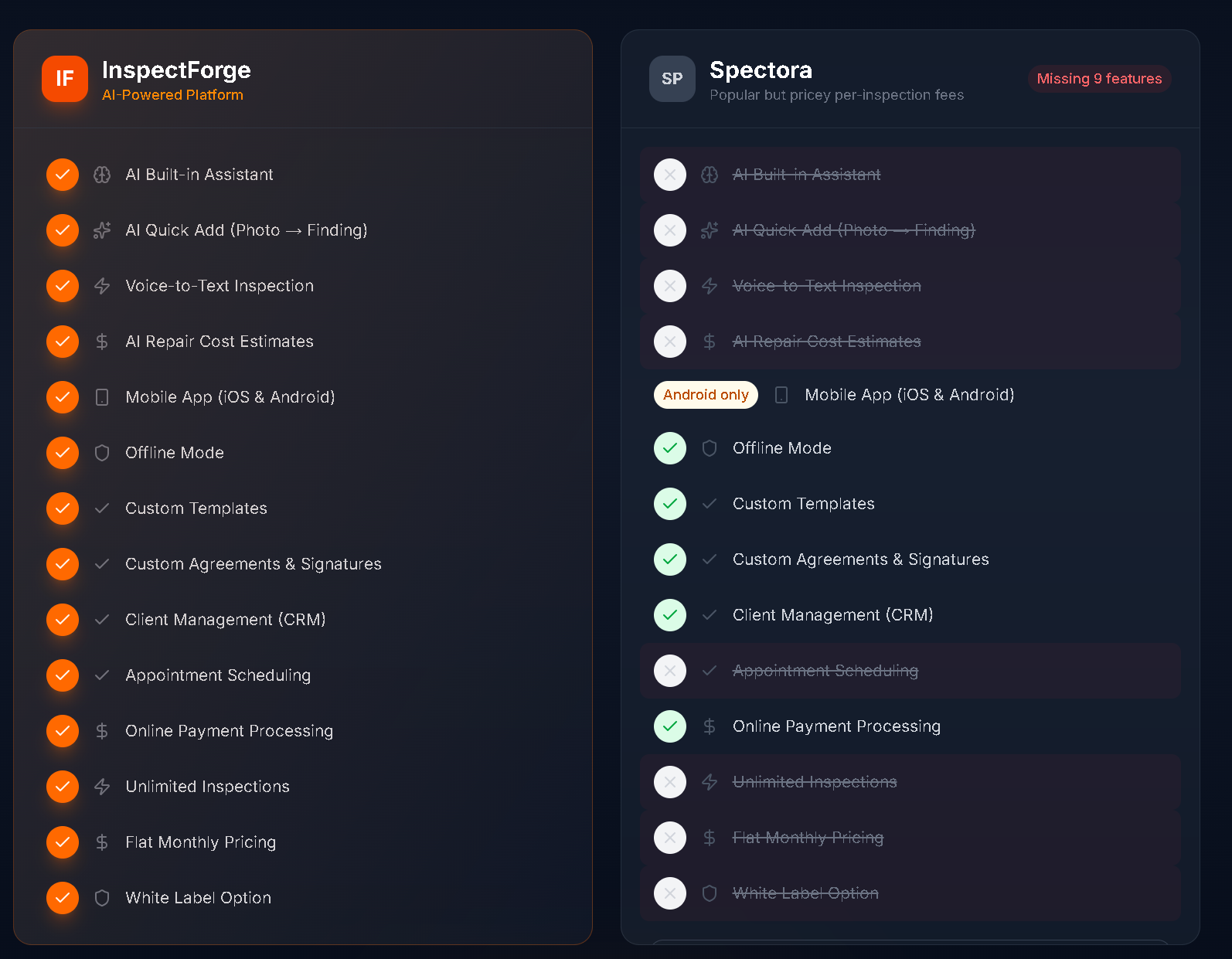
| Feature | InspectForge | Spectora |
|---|---|---|
| Report output | Professional PDF + HTML | Interactive HTML + PDF |
| Create Request List (CRL) | Not available | Yes (strong feature) |
| Native mobile app | iOS & Android (native) | Web-based (responsive) |
| Offline mode | Full offline with auto-sync | Limited |
| AI report writing | Full MI6 suite | Limited AI |
| AI photo analysis | Yes (Business plan) | No |
| AI report summaries | Yes (Pro & Business) | No |
| AI template generation | Yes (Business plan) | No |
| Built-in scheduling | Yes (native) | Yes |
| Payment processing | Stripe integration | Stripe integration |
| Digital agreements/e-sign | Yes (native) | Yes |
| Team management | Up to 10 inspectors | Yes |
| Online booking | Yes | Yes |
| Calendar sync | Yes | Yes |
Where Spectora Wins
Interactive HTML reports. Spectora's HTML reports are widely considered the best-looking in the industry. Clients can click through sections, filter by severity, and view photos inline. If your agents specifically prefer the Spectora report format, that is a legitimate consideration.
Create Request List. Spectora's CRL feature is well-developed and popular with real estate agents. Agents can select findings and generate a repair request document directly from the report. InspectForge does not currently offer this feature.
Established brand. Spectora has been in the market longer and has broader name recognition among agents. Some agents specifically ask for Spectora reports.
Where InspectForge Wins
AI capabilities. InspectForge's MI6 AI assistant is a generation ahead. AI photo analysis, comment generation, report summaries, and template creation are not available on Spectora at a comparable level. This directly reduces your post-inspection time.
Native mobile experience. InspectForge runs as a true native app on iOS and Android, providing faster photo capture, smoother annotation, and reliable offline mode. Spectora's web-based mobile interface works but has inherent browser limitations.
Pricing structure. Flat subscription pricing means your costs never increase with volume. Every additional inspection improves your per-inspection margin instead of adding cost.
Platform independence. InspectForge is an independent company. Spectora is now owned by EQT Partners (the same private equity firm that acquired HomeGauge), which raises questions about future pricing and innovation direction.
The Hidden Costs Most Inspectors Miss
Time Cost: Post-Inspection Report Writing
This is the biggest "hidden cost" in inspection software, and it is where InspectForge's AI features create the most value.
Without AI assistance (typical Spectora workflow):
- Select pre-written comments or type custom narratives
- Edit and customize for each finding
- Write executive summary manually
- Review and finalize
- Average time: 1.5–3 hours per inspection
With MI6 AI assistance (InspectForge workflow):
- AI generates professional narratives from your finding selections
- AI creates executive summary from your findings
- Review and publish
- Average time: 30–60 minutes per inspection
Time savings per inspection: 1–2 hours At 20 inspections per month: 20–40 hours saved Value of saved time at $50/hour: $1,000–$2,000/month
Even if you value the AI time savings conservatively at $500/month, that dwarfs the $100+/month price difference between the platforms.
Opportunity Cost: Same-Day Report Delivery
Inspectors who deliver reports within 24 hours (ideally same-day) win more agent referrals. AI-powered report writing makes same-day delivery realistic for every inspection, not just simple ones. The referral business you gain from faster turnaround has compounding value over time.
Tool Consolidation
Spectora requires separate subscriptions for some capabilities that InspectForge includes natively:
- ISN or other scheduling tool (if Spectora's built-in scheduling does not meet your needs)
- Additional payment processing fees depending on configuration
- Third-party tools for capabilities Spectora does not include
These incremental costs add up across a year.
Migration: What Switching Actually Looks Like
If you are currently on Spectora and considering InspectForge, here is what the transition involves.
What You Keep
- Your inspection knowledge and expertise — obviously
- PDF exports of your existing reports — export your Spectora reports as PDFs before switching
- Your client and agent relationships — these follow you, not your software
What You Rebuild
- Templates — You will need to create templates in InspectForge, but the AI template generation feature makes this dramatically faster than building from scratch. Describe your inspection type in plain language and get a complete template.
- Workflow muscle memory — Budget 3–5 inspections to get comfortable with the new interface. Most inspectors report full comfort within the first week.
Recommended Transition Plan
- Week 1: Sign up for InspectForge's 14-day free trial. Build your primary inspection template using AI template generation.
- Week 2: Run 2–3 practice inspections on InspectForge alongside your normal Spectora workflow. Compare the results.
- Week 3: If satisfied, switch your new inspections to InspectForge. Keep your Spectora account active for one more month as a safety net.
- Week 4: Cancel Spectora and begin saving immediately.
Who Should Stay on Spectora?
This is not the right switch for everyone. Stay on Spectora if:
- Your agents require Spectora CRL specifically. If your referral network depends on the Create Request List feature and agents will not accept alternatives, the CRL is worth the premium.
- You do fewer than 10 inspections per month. At very low volumes, the per-inspection cost difference is smaller, and the migration effort may not be justified.
- You have deeply customized templates and workflows on Spectora that would take significant time to recreate, and you are not interested in using AI to accelerate that process.
- You specifically prefer the interactive HTML report format over PDF-first delivery.
Who Should Switch to InspectForge?
Consider switching if:
- You perform 15+ inspections per month and per-inspection fees are cutting into your margins
- You want AI features that reduce post-inspection time from hours to minutes
- You want a native mobile app that works reliably in basements, crawlspaces, and areas with poor connectivity
- You want predictable monthly costs that do not increase as your business grows
- You are concerned about platform independence and the implications of the Spectora/HomeGauge merger under private equity ownership
- You are starting a new business and want modern tools without legacy constraints
The Bottom Line
| Factor | InspectForge | Spectora |
|---|---|---|
| Annual cost (20 insp/mo) | $468–$1,188 | ~$2,028 |
| Cost trend as you grow | Stays flat | Increases linearly |
| AI capabilities | Full suite (MI6) | Limited |
| Mobile experience | Native iOS & Android | Web-based |
| Report format | PDF + HTML | Interactive HTML (stronger) |
| CRL feature | No | Yes |
| Platform independence | Independent | EQT Partners (PE-owned) |
InspectForge saves most inspectors $1,200–$1,900 per year in direct software costs compared to Spectora. When you add AI-driven time savings, the total value difference is significantly larger.
The question is not whether InspectForge is cheaper — it clearly is. The question is whether Spectora's interactive reports and CRL feature justify paying $1,200+ more per year and missing out on AI capabilities that are rapidly becoming industry standard.
For most inspectors in 2026, the math favors InspectForge.
Start your 14-day free trial at inspectforge.com — no credit card required. See the savings for yourself.
Pricing data in this article is based on publicly available information as of March 2026. Features and pricing may change. We recommend verifying current details directly with each provider. InspectForge is the publisher of this article — while we have aimed for balanced, factual comparison, readers should consider this context.