Best Construction Inspection Software in 2026: Complete Comparison for GCs and Project Managers
Best Construction Inspection Software in 2026: Complete Comparison for GCs and Project Managers
Construction inspection software has evolved from basic digital checklists into platforms with AI-powered defect detection, real-time corrective action workflows, photo-documented punch lists, and safety trend dashboards. The best platforms in 2026 help general contractors and project managers catch safety hazards before someone gets hurt, document quality issues before they get buried behind drywall, and generate the inspection records that protect your company during disputes. This guide compares the top construction inspection platforms on the features, pricing, and capabilities that matter most.
Why Construction Inspection Software Matters in 2026
If your project team is still running inspections on paper forms, clipboard checklists, or unstructured photo albums, you are operating with one hand tied behind your back.
The business case for digital construction inspections:
- OSHA compliance documentation. OSHA 29 CFR 1926 requires documented inspections for scaffolding, excavations, cranes, fall protection, and electrical systems. Digital records are timestamped, photo-documented, and instantly retrievable during an inspection or investigation.
- Quality defect prevention. A framing defect caught during a daily walk-through costs $200 to fix. The same defect found during a punch list after finishes are installed costs $2,000–$10,000. After occupancy warranty claims, it can cost $20,000+.
- Dispute protection. Construction claims and litigation hinge on documentation. Timestamped photos showing site conditions on specific dates are the strongest evidence you can produce.
- Subcontractor accountability. When every safety violation and quality defect is photographed, attributed, and tracked, subcontractors take inspections seriously because the documentation is undeniable.
- Safety culture. Projects with consistent, documented inspection programs have fewer injuries. The documentation is not just about compliance — it changes behavior.
Quick Comparison: Top Construction Inspection Platforms
| Software | Best For | Pricing Model | AI Features | Offline Mode | Photo Documentation |
|---|---|---|---|---|---|
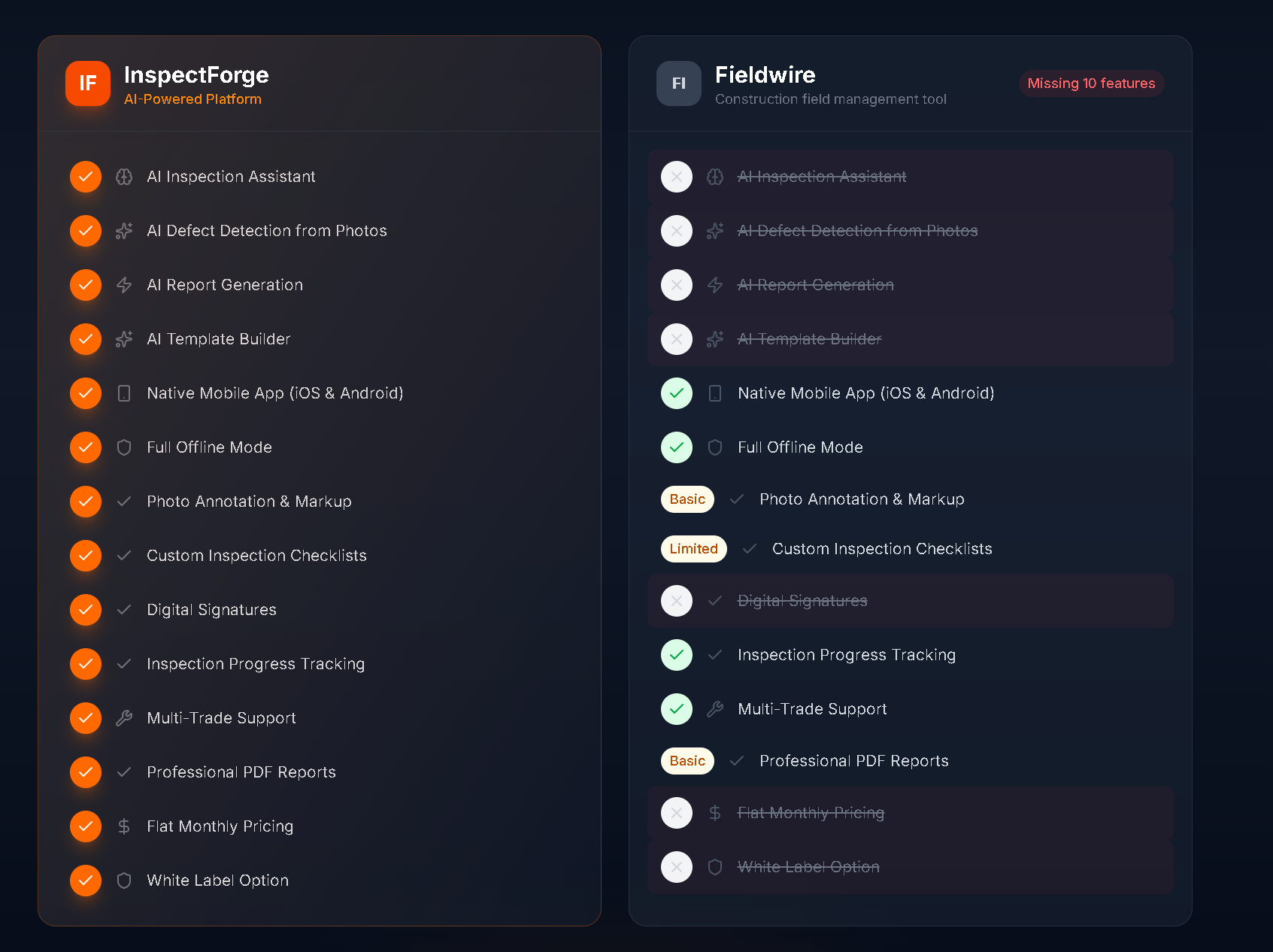
| InspectForge | AI-powered inspections, multi-industry | Flat monthly ($39–99) | Full AI suite | Full offline | Photos + AI analysis |
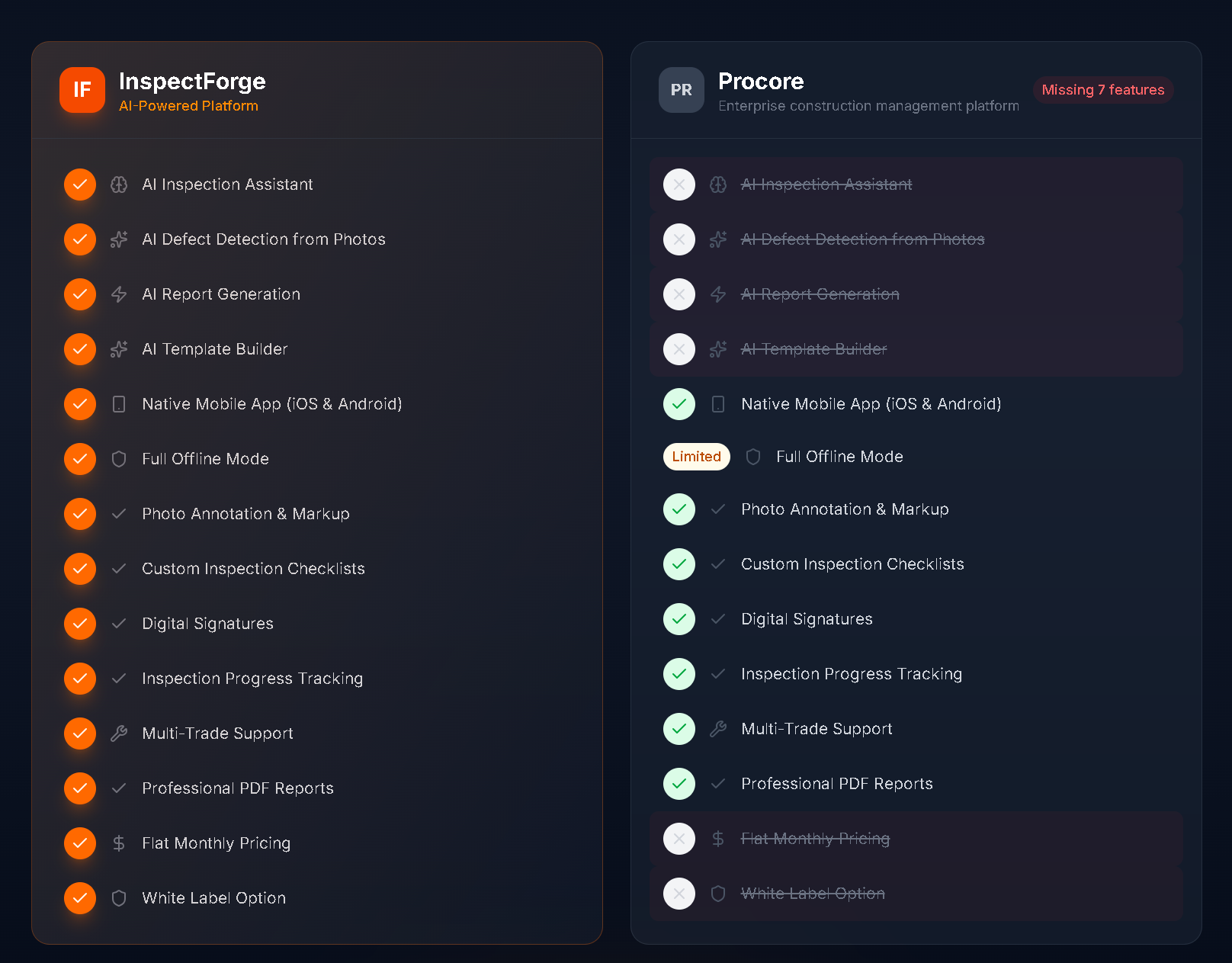
| Procore | Enterprise project management | Per project (enterprise) | Basic | Limited | Photos with markup |
| Fieldwire | Task and punch list management | Per user ($39–59/mo) | None | Yes | Photos with annotations |
| iAuditor (SafetyCulture) | Safety inspection templates | Per user ($24–49/mo) | Basic | Yes | Photos with annotations |
| GoCanvas | Custom digital forms | Per user ($30–45/mo) | None | Yes | Basic photo capture |
| ComplianceQuest | Enterprise quality management | Enterprise pricing | Basic | Limited | Document management |
What to Look for in Construction Inspection Software
1. Mobile App Built for Job Sites
Construction inspections happen outdoors in rain, dust, and extreme temperatures. On scaffolding. In excavations. The mobile app is the product.
Must-haves:
- Native iOS and Android apps (not a mobile-responsive website that freezes in the sun)
- Large, glove-friendly buttons — field workers cannot tap tiny UI elements with work gloves
- Full offline mode — many job sites have no cell service, especially during early phases before temporary internet is installed
- Fast photo capture — snap photos, annotate them, and move on without lag or crashes
- GPS tagging — every inspection and photo is automatically location-stamped
2. Safety-Specific Templates
Generic form builders do not understand construction safety. Your software should include:
- OSHA-aligned safety templates covering the Fatal Four (falls, struck-by, electrocution, caught-in/between)
- Competent person inspection checklists for scaffolding, excavations, and cranes
- PPE compliance checks with photo-required items
- Hot work permit templates for welding, cutting, and brazing
- Daily site safety walk-through templates covering all active work areas
3. Corrective Action Workflows
Finding a hazard is half the job. The other half is getting it fixed and documenting the resolution.
Must-haves:
- Assign deficiencies to specific subcontractors or individuals with photo evidence
- Set deadlines for corrective action with automatic notifications
- Resolution documentation requiring photo proof that the issue was corrected
- Escalation rules for overdue items
- Corrective action reports showing open vs. closed items by subcontractor, by trade, by time period
4. AI and Photo Analysis
AI is the biggest differentiator in construction inspection software in 2026:
- AI defect detection — photograph a structural connection, rebar placement, waterproofing detail, or safety setup and get automated condition assessment
- AI-generated descriptions — professional documentation without typing on a phone on a scaffold in the wind
- Photo comparison — AI compares current photos to previous inspections of the same location to identify changes
- Pattern recognition — identify which subcontractors, trades, or work areas generate the most safety or quality issues
5. Reporting and Dashboards
Construction executives and owners want data, not anecdotes:
- Safety trend dashboards showing violations by type, subcontractor, and time period
- Quality deficiency reports with photos, corrective actions, and resolution status
- OSHA inspection-ready exports of all safety documentation
- Project comparison — how does this project's safety record compare to others in your portfolio?
- Subcontractor scorecards based on inspection data
The Top Construction Inspection Platforms in 2026
1. InspectForge — Best for AI-Powered Construction Inspections
InspectForge is a multi-industry inspection platform that supports construction, commercial, facility, and fleet inspections in a single subscription. Its construction capabilities include AI-powered defect detection, customizable safety and quality templates, corrective action tracking, and project-level dashboards.
Key construction features:
- MI6 AI defect detection — photograph structural connections, rebar placement, waterproofing, or safety setups for automated condition assessment and professional documentation
- Custom inspection templates — build templates for daily safety walks, scaffold inspections, excavation checks, quality hold points, punch lists, and any other inspection type
- Photo annotations with arrows, circles, and text labels for clear documentation
- Corrective action tracking — assign findings to subcontractors with photo evidence, deadlines, and resolution requirements
- QR code scan-to-inspect — tag areas, equipment, or systems for quick template loading
- Digital twin technology — every project gets a persistent digital identity with full inspection history
- Full offline mode with automatic sync (essential for remote job sites)
- Native iOS and Android apps designed for field use
- Project dashboard showing safety trends, open deficiencies, and completion rates
Pricing: $39/month (Starter), $69/month (Pro), $99/month (Business with up to 10 inspectors). No per-project or per-user fees.
Best for: General contractors and construction managers who want AI-powered inspections, flat pricing across multiple projects, and a platform that also handles fleet and facility inspections for their broader operations.
Try it free: Start a 14-day trial and build your first safety walk-through template in minutes — no credit card required.
2. Procore — Best for Enterprise Project Management
Procore is a comprehensive construction project management platform that includes quality and safety inspection modules as part of a broader suite covering project management, financials, and field operations.
Key features:
- Quality and safety observation tools integrated with project management
- Punch list management with photo documentation
- Drawing and document management
- RFI and submittal workflows
- Project financials and change order tracking
- Subcontractor management
- Enterprise reporting across project portfolio
Pricing: Enterprise pricing based on annual construction volume. Typically $500–$2,000+/month depending on company size. Annual contracts required.
Best for: Large general contractors (annual volume $50M+) that need construction inspection capabilities integrated with full project management, financials, and document control.
Limitations: Overkill for firms that primarily need inspection software. Inspection and safety modules are secondary features — less depth than dedicated inspection tools. Very expensive. Long implementation timelines.
3. Fieldwire — Best for Task and Punch List Management
Fieldwire is a field management platform focused on task management, punch lists, and field collaboration built on top of construction plan views.
Key features:
- Plan-based task management — pin tasks and observations directly on drawings
- Punch list management with photo documentation
- Daily reports and safety inspections
- Drawing management with version control
- Team chat and collaboration
- Offline plan access
- Basic inspection checklists
Pricing: Per-user pricing starting at $39/month (Pro) up to $59/month (Business). Free tier available for small teams (limited features).
Best for: Construction teams that want field task management tied to plan views, with inspection checklists as one part of the workflow.
Limitations: Inspections are secondary to task management — limited template customization, no AI features, basic corrective action tracking. Per-user pricing adds up for larger field teams.
4. iAuditor (SafetyCulture) — Best for Safety Template Libraries
iAuditor by SafetyCulture is a general-purpose inspection platform with a large library of pre-built safety templates, including many construction-specific checklists.
Key features:
- Extensive template library (thousands of pre-built checklists)
- Custom template builder
- Photo capture with annotations
- Corrective action assignment and tracking
- Analytics and reporting
- Multi-language support
- Offline mode
Pricing: Per-user pricing starting at $24/month (Premium) up to $49/month (Enterprise). Free tier available with limited inspections per month.
Best for: Safety-focused teams that want access to a large library of pre-built construction safety templates with basic corrective action tracking.
Limitations: Generic platform — not construction-specific. No plan-view integration. No AI defect detection or photo analysis. Template library is broad but many templates need customization for your specific project requirements. Per-user pricing for field teams.
5. GoCanvas — Best for Custom Digital Forms
GoCanvas is a mobile form platform that lets you build custom digital inspection forms for any purpose.
Key features:
- Drag-and-drop form builder
- Custom workflows and approvals
- Photo and signature capture
- PDF report generation
- Integration with other construction tools
- Offline mode
- Multi-platform support
Pricing: Per-user pricing starting at approximately $30–$45/month. Enterprise pricing available.
Best for: Teams that need maximum flexibility to build completely custom inspection forms that match their existing paper processes.
Limitations: It is a form builder, not an inspection platform — no safety templates, no AI, no corrective action workflows, no safety dashboards. You build everything from scratch. No construction-specific features.
Pricing Comparison: What Construction Inspection Software Really Costs
| Team Size | InspectForge (Business) | Fieldwire | iAuditor | GoCanvas |
|---|---|---|---|---|
| 3 inspectors | $99/mo | $117–177/mo | $72–147/mo | $90–135/mo |
| 5 inspectors | $99/mo | $195–295/mo | $120–245/mo | $150–225/mo |
| 10 inspectors | $99/mo | $390–590/mo | $240–490/mo | $300–450/mo |
| 20 inspectors | Contact sales | $780–1,180/mo | $480–980/mo | $600–900/mo |
Key takeaway: Per-user pricing is the norm in construction inspection software. For teams of 3+ inspectors, flat monthly pricing delivers significant savings. At 10 field inspectors, InspectForge costs 60–85% less than per-user alternatives.
AI in Construction Inspections: The 2026 Differentiator
Most construction inspection platforms have not adopted AI yet. Here is what AI-powered construction inspections look like:
AI Defect Detection
A superintendent photographs a structural steel connection during a daily walk-through. The AI analyzes the image and reports:
- Bolt pattern matches connection detail — appears correctly installed
- Visible rust on base plate — severity: minor, recommend protective coating
- No visible cracks or deformation at weld locations
Without AI, the superintendent either misses the rust (small detail in a busy day) or notes "connection looks okay" — providing no useful documentation for the steel erector's quality record.
AI-Generated Documentation
Instead of typing detailed descriptions on a phone while standing on a scaffold in January, the superintendent taps "structural steel" and "condition concern." The AI generates: "Structural steel base plate connection at grid B-3 shows early-stage surface oxidation. Bolt pattern and weld locations appear consistent with connection detail. Recommend protective coating application by steel erector within 14 days to prevent progressive corrosion."
This professional documentation goes into the project record — attributable, timestamped, and photo-supported.
Safety Trend Analysis
Over the course of a 14-month project, AI identifies patterns:
- "Fall protection violations have increased 40% since framing started on floors 4–7 — recommend additional fall protection training and increased guardrail inspection frequency"
- "Electrical subcontractor has 3x the corrective action rate of other trades — recommend safety meeting and closer inspection of temporary power installations"
How to Choose the Right Platform
Small GC (1–3 active projects, 5–15 field staff)
Priority: Low cost, easy setup, OSHA compliance documentation. Recommendation: InspectForge Starter or Pro ($39–$69/month) provides more capability than small teams typically need, at less than the cost of one user license on most alternatives. iAuditor's free tier works for very basic needs but limits inspections per month.
Mid-Size GC (3–10 active projects, 15–50 field staff)
Priority: Multi-project visibility, subcontractor accountability, safety trend tracking. Recommendation: This is where per-user pricing becomes prohibitive. A 10-person field team on Fieldwire costs $390–$590/month; on InspectForge it is $99/month. AI defect detection adds value at this scale with more projects generating more inspections.
Large GC ($50M+ annual volume, 50+ field staff)
Priority: Enterprise features, portfolio dashboards, integration with project management. Recommendation: If you need inspection capabilities integrated with full project management, financials, and document control, Procore may justify its premium. If your primary need is inspections and safety documentation, InspectForge delivers better inspection features at a fraction of the cost.
Specialty Contractors
Priority: Trade-specific templates, corrective action documentation, compliance records. Recommendation: InspectForge's custom template builder lets you create trade-specific inspection checklists (electrical, mechanical, structural, fire protection) that match your scope of work. Flat pricing means you do not pay more as you add project engineers and foremen.
Frequently Asked Questions
What construction inspections does OSHA require?
OSHA requires documented inspections for several specific systems: scaffolding before each shift and after any event that could affect integrity (1926.451), excavations before each shift and after rain (1926.651), cranes daily by the operator (1926.1412), personal fall arrest equipment before each use (1926.502), and fire extinguishers per 1926.150. Additionally, the general duty clause requires employers to provide a workplace free from recognized hazards — which effectively requires regular safety inspections of all active work areas.
Can construction inspection software replace a safety director?
No. Software is a tool that makes a safety director or competent person more effective — not a replacement for qualified safety professionals. The software ensures inspections happen consistently, findings are documented with photo evidence, corrective actions are tracked to completion, and trends are visible for data-driven decisions. But the expertise to identify hazards, determine corrective actions, and manage safety programs still requires qualified people.
How does digital inspection data help during OSHA inspections?
When an OSHA compliance officer arrives on your site, they will review your inspection records, safety programs, and documentation of hazard identification and correction. Digital records showing consistent daily inspections, photographic documentation of conditions, and documented corrective actions demonstrate a proactive safety program — which can influence whether a citation is issued and the severity of penalties.
What about punch list management — is that the same as construction inspections?
Punch lists are a specific type of construction inspection focused on deficiency identification before substantial completion. Many construction inspection tools include punch list features, but inspections are broader — covering safety walks, quality hold points, scaffold checks, excavation inspections, and ongoing site documentation throughout the project lifecycle. Punch lists are a subset of the inspection program.
The Bottom Line
Construction inspection software in 2026 is splitting between generic form tools that digitize paper checklists, project management suites that include basic inspection modules, and dedicated inspection platforms that add AI, photo analysis, and corrective action workflows.
For general contractors and project managers who want the most capable inspection tool at the best price, InspectForge offers AI defect detection, customizable safety and quality templates, corrective action tracking, and flat pricing that does not penalize you for adding projects or field staff. For firms that need full project management (financials, RFIs, submittals) alongside inspections, Procore covers more ground at a much higher cost.
Whatever platform you choose, the move from paper to digital construction inspections is no longer optional. The projects that finish safely, on quality, and with documentation that protects the company are the ones with consistent, digital inspection programs.
Explore InspectForge's construction inspection capabilities at inspectforge.com/commercial-inspection-software.
Related Reading
- Construction Site Inspection Checklist: Complete Safety & Quality Guide — Every item on the OSHA-aligned construction inspection checklist
- InspectForge Commercial Inspection Software — Multi-site management, compliance templates, AI-powered reports
- Best Fleet Inspection Software 2026 — For contractors who also manage fleet and heavy equipment inspections
- DOT Pre-Trip Inspection Checklist — For construction fleet managers
Comparison data in this article is based on publicly available information as of March 2026. Features and pricing may change. We recommend evaluating any platform with a free trial before making purchasing decisions.